

I Do One Job on My Engineering Team. The AI Does the Rest.
You do not need to code. You need to be the PM. How I direct, review, and ship a real app with a team of AI agents.


It started as an annoyance. Every time I sit down to review one of my Substack drafts, I end up living between two screens.
The draft in one tab, a separate Claude chat in another. I copy the entire article, ask for a check, read the reply, switch back, paste the fix, and do it again. By the third article of the week, the switching costs me more than the writing does.
So I decided to build my way out of it. I’m building a Chrome extension that runs QA on my drafts without switching screens, right where the words are. This is a pet project to save a few minutes across the week which I can allocate to something productive like scolding Claude in PowerPoint for not aligning a box properly.
I ran the full build from VS Code with Claude Code, with a full team at my disposal. It just so happens I pay them a few cents per hour. The BMAD method is a vibe coding framework I’ve been implementing over the past few months, which has really brought structure into my software projects.
Here’s the team 👇.
John, the product owner, runs the market research, writes the documentation, facilitates the product decisions, and clarifies what each feature needs to do.
Sally, the designer, owns how it looks and feels.
Winston, the architect, decides how it is put together.
Bob, the scrum master, keeps the documentation current, the project moving, and the team's context up to date.
Amelia, the developer, builds it. Every one of them is an AI agent. The role I prefer to play is the product manager: I set the product direction, decide the features, and give the final approval before anything goes live.
My time goes to the decisions. I choose what we build next and why. I send the right problem to the right specialist. I test what comes back, and I push back when it is not good enough. And I am the final yes before anything ships. I direct, I review, and I approve.
What changed is the execution. The agents run all of it now, and the project management with it: they write the code, keep the documentation current, move the tickets, and pass information between each other without me in the loop. What is left for me is the judgment: deciding what we build, deciding what good looks like, and owning the reviews and the approvals. I can take my hands off, knowing the project management gets done whether I am watching or not.
Here is the part that did not exist cleanly until recently.
👋 Hi, I’m Ashwin
Cash & Cache is for people building with AI: workflows, agents, skills, and the strategy behind them. Along with Raghav, I publish weekly on AI implementation & strategy.
Browse the Library → Cash & Cache Library
Not sure where to start? Take the quiz
*****************
The gap between a demo AI builds in an afternoon and a product you can actually run is structure: a real team, version control, and proper reviews. Here is how I get all of it from AI agents.
In this article, we will cover…
What it looks like in practice and the full execution workflow using the agents in Git and Jira
How you approve work you cannot read: the Code Evaluator Agent

The problem this article solves
Building with AI used to mean making a skill for each task. One skill for one job, each useful on its own. The trouble is they are islands: they do not know about each other, they do not hand work back and forth, and nothing holds them to a shared plan.
To build an actual product, those skills have to become a team. That takes a framework, one that connects them into a single system where each specialist knows its role and information flows easily between them.
Check out our earlier article that shows you how to chain your individual skills together into one slash command. 👇

Working like a modern software team means working in an agile way. You ship in small pieces, building the application slowly and improving it as you go.
Agile runs on strong communication: a unified approach to what you are building, and an easy flow of information as the work moves. Every person has a distinct role in shaping the outcome. In my projects I use two tools that help build a strong contextual foundation: GitHub and Jira. Git is where the code is hosted, and where every new feature gets merged into main. Jira is where the communication lives, with the requirements and the development tracked in one place.
If you have not heard of BMAD before, here is the short version. It brings structure to vibe coding. Instead of one chat trying to do everything, it gives you a small team of AI agents, each with a clear role, that plan, build, and test the way a real software team does. You install it once, then you run the team instead of starting from a blank prompt every time.
BMAD gives you the framework. It hands you a standing team, ready on day one, instead of skills you wire up one at a time. Claude Code runs the tools for you. It connects the team straight into Git and Jira, so the agents do the commits, the pull requests, and the tickets. You get the agile structure and the communication without operating either tool yourself. What is left for you is the work worth doing.

What you need for this
Before the walkthrough, here is the short list to have ready. Most of it is free, and Claude is the one paid piece.
Claude Code, running in VS Code (any IDE works), on a Claude plan.
BMAD installed (full guide: https://github.com/bmad-code-org/bmad-method).
Git and the GitHub CLI (gh), plus a free GitHub account (setup guide: https://cli.github.com).
A free Atlassian account with Jira.
A small project or idea you want to build.
Meet the team
BMAD gives you named specialists, your team, which can be installed for each project.
John, the product owner, handles the analysis and documentation and clarifies what each feature needs to do.
Sally, the designer, handles the look and the user experience.
Winston, the architect, decides how it should be built.
Bob, the scrum master, keeps the documentation current, the project moving, and the team’s context up to date.
Amelia, the developer, builds it.
An orchestrator (you) routes the work to the right one. You manage by role. You give a job to the specialist who owns it, the same way you would with people.

5 Terms to Get Out of the Way
This walkthrough uses Git to host the code we will write. Here are some terms that we will be using in the walkthrough.
A repository is the folder that holds your whole project, with Git tracking every change to every file in it.
A commit saves new work into the project, each one a checkpoint with a short note on what changed. You can go back to any commit later.
A branch is a separate line of work where you make and test a change without affecting the main version, until you decide to bring it in.
A pull request is a change waiting to join the main version, where it gets one last review before it goes in.
A merge combines the approved changes into the main version. That is when it goes live.
That is the whole vocabulary. Your agents do the typing. You do the approving.

What it looks like in practice and the execution workflow
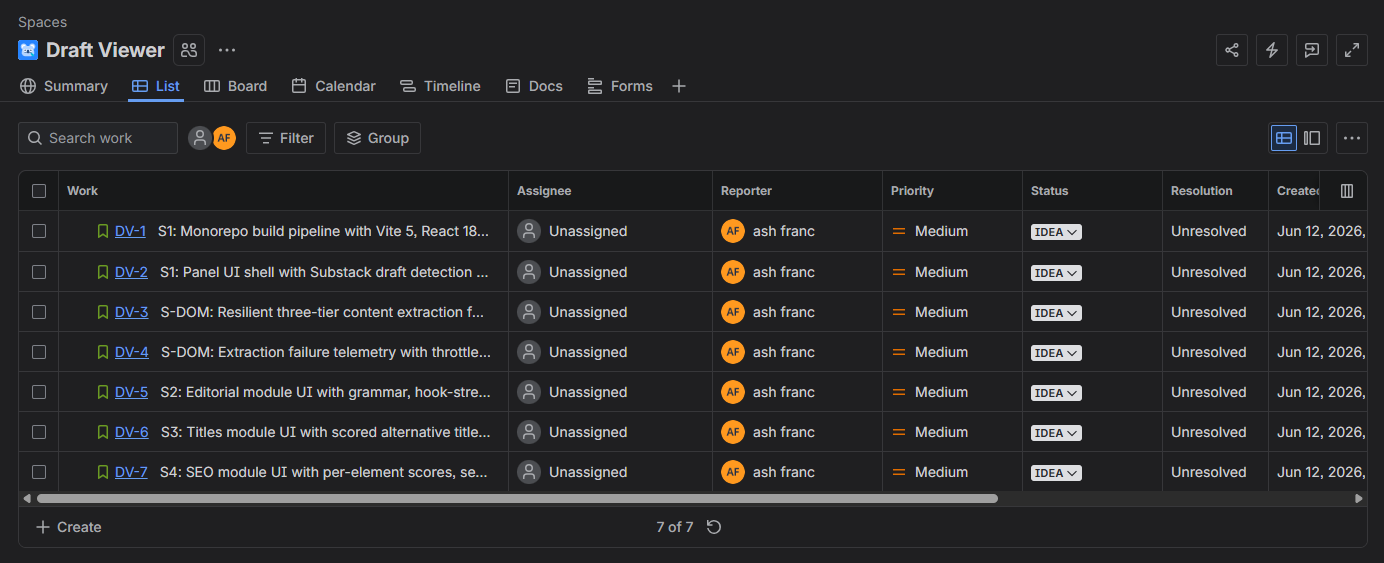
Here is the system running on my draft viewer project. Every ticket on the board is written by John, the product owner, who turns each piece of the plan into a ticket that Amelia can pick up to code. The tickets move across the board as the work happens, and a ticket only reaches Done after Winston, the architect, has validated the code behind it.
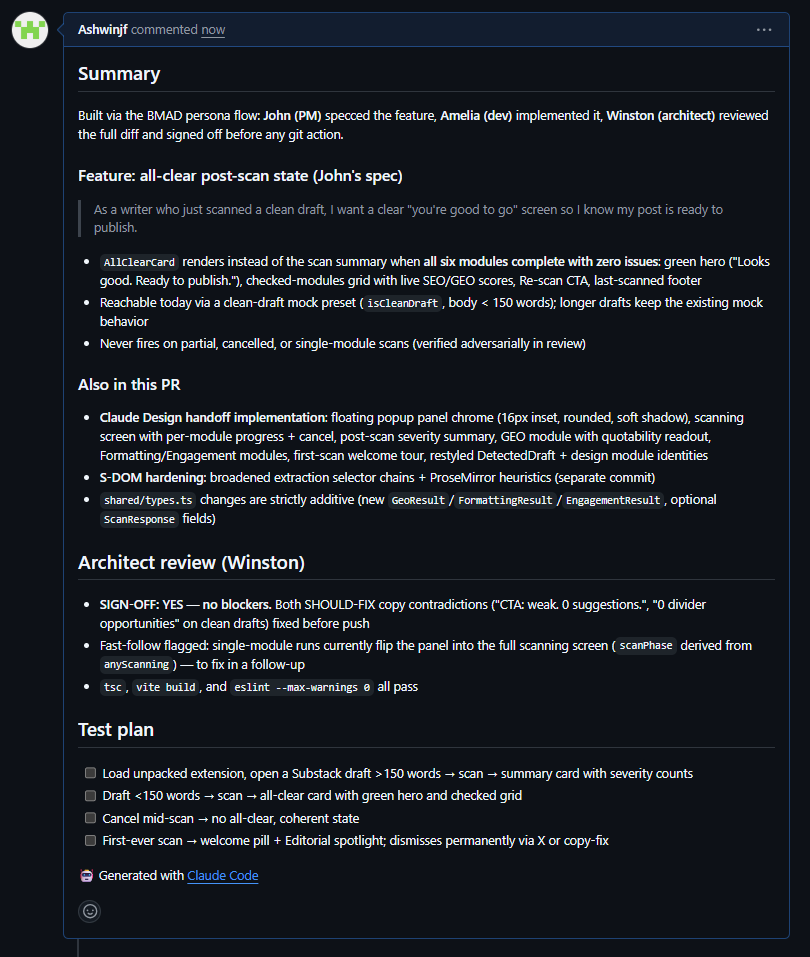
Each code change shows up as a pull request, written by the agents. It spells out what changed and why, so I can see what changed and why, before it merges. If you work with a team, this is what helps set context and ensure communication is clear.
Wire the team into Git and Jira
This is the step that makes the agents run the tools, so you never administer either one. You do each setup once.
Set up Git, so your code has a home online.
Install Git (on Windows, use Git for Windows) and the GitHub CLI.
Create a free GitHub account, then a new, empty repository. Leave “Add a README,” “.gitignore,” and “license” unchecked, so it is completely empty. (Private repos are free, so your code stays yours.)
Sign in once: open a terminal in your IDE, the same VS Code window where Claude Code runs, type
gh auth login, press Enter, and sign in through the browser that opens. That login is what lets your machine push to GitHub.On the page that opens right after you create the repo, find the “Quick setup” box, make sure HTTPS is selected (not SSH), then click the copy icon next to the link that ends in .git.
Open Claude in the folder that holds your project, then tell it:
Set up Git in this folder and connect it to my GitHub repository at [paste the link].Before this first upload: if your project has any passwords, API keys, or .env files, tell Claude. Once code is on GitHub, treat anything in it as exposed.
Connect Jira, so the agents can read and update your tickets.
Make sure you have an Atlassian account with Jira.
Create a project in Jira (Projects → Create project). The agents fill a project with tickets, but they cannot create the project itself, so you do this one part by hand, once. Note the short project key Jira shows next to the name, like “Draft Viewer (DV).”
In Claude, open the Connectors tab and add the Atlassian Rovo connector.
A browser window opens. Sign in to Atlassian and approve access.
Back in Claude, check that the connector shows as connected.
Then tell Claude:
Create the Jira tickets in [PROJECT KEY] for the stories in our plan, and keep them updated as we work.From here, whenever you work with the team on a story, Claude updates its ticket as part of the job, so your board shows real progress instead of you keeping it current by hand.
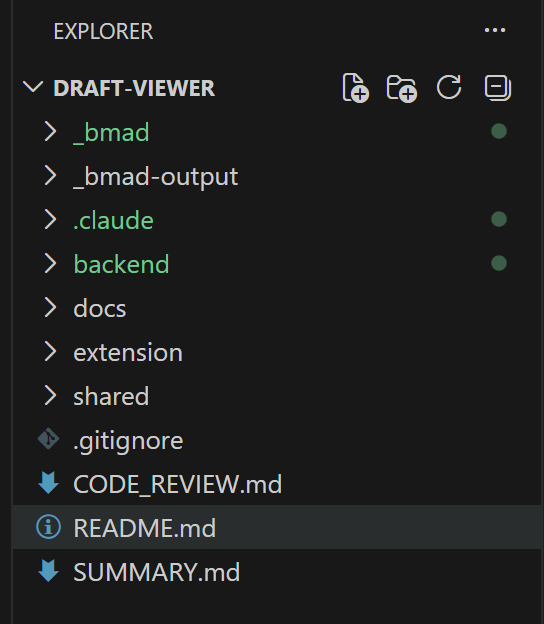
Your team is now set up and wired in. The rest is how you actually run them, day to day.

🔒 Now you run the team
You have the team set up and wired in. Below is how I actually run it as the PM, day to day.
💎 Premium subscribers get full access to the agent that reviews the code, including a skill file that runs the product questions before you build and reviews the work after it is built. The skill is also available in our Cash & Cache Library, along with a handful of paid resources for you to download and use!
