

Perplexity Computer is Not a Search Engine. Stop Treating It Like One.
How to build automated workflows in Perplexity Computer, write prompts that save your credits, and get publication-ready results without the expensive learning curve.


For months, Gemini and Claude kept releasing interesting feature after interesting feature, and Perplexity had lost some of its innovation rigor.
Deep Research was good, but Gemini’s version got better. Pro Search was useful, but Claude Code handled most of what I needed in a single context window.
Then Perplexity launched Computer.
Computer works differently from every other AI tool I’ve used. You give it a task and it breaks the task into pieces, spins up a separate sub-agent for each piece, assigns the best-fit model to each one, and runs all of them simultaneously in the background. It can write and execute code mid-task, connect to external apps, and route different parts of your workflow to different AI models depending on what each step actually needs.
That got my attention. I wanted to know if I could turn it into a working AI research system for my newsletter without burning through the 10,000 monthly credits in the first week.
I did not start elegantly. My first prompt was a brilliantly crafted “What can Perplexity Computer do?” — roughly 40 credits gone.
But that’s how you learn the edges of a new tool, and everything that follows in this article is what came after that. Consider it your shortcut past the expensive part of the learning curve.
What we will cover today:
Let’s begin!

The Perplexity Stack & When to Use Computer
Perplexity now has four different product tiers, and each one costs differently. Using Computer for a question Pro Search answers in 10 seconds is like hiring a full project team to send one email.
The four tiers break down like this.
Perplexity Comet is the AI-native browser. Unlimited on Comet Pro. Use it for tab-level browsing, page summaries, and routine web research. This is where 80% of daily AI work should happen.

Pro Search answers factual questions quickly from a limited source pool. First filter. If the answer exists and you just need it collected, Pro Search handles it.
Deep Research is where things get more expensive: 20 runs per month on Pro. It synthesizes insights across 50+ sources and produces long-form analytical reports. One run equals one serious research task.
Perplexity Computer (Max plan only, $200/month) runs on credits: 10,000 per month plus a one-time bonus for early adopters. It spawns parallel sub-agents, executes code, and connects to 400+ apps. Use it only when a task needs parallel processing across multiple sources, code execution, or tool integration. Everything else belongs in a cheaper tier.
Note: The Perplexity website mentions that access is only for the Max plan with rollout for Pro and enterprise plans in the works. But I was able to access this through my Enterprise Pro plan.
If one model in one shot can answer it, it doesn’t belong in Computer. Computer’s value is coordination across multiple systems, not single-step lookup.
Knowing when to use Computer is half the equation. The other half is knowing how to talk to it. A vague prompt costs you two-fold: vague outputs and expensive compute. Computer interprets ambiguity as permission to go wide.
The CO-STAR Method: How to Write Computer Prompts That Don’t Waste Credits
Computer’s multi-agent setup tries to do everything if you let it. A vague prompt gives Computer no constraints, so it spins up agents, interprets broadly, and burns credits figuring out what you actually wanted. Specificity saves money.
CO-STAR is a six-part prompt structure widely used in prompt engineering. Each element constrains one dimension of the task so Computer doesn’t have to guess.
Context: Background on the task, who you are, and which sources to use. “I run a newsletter for non-technical AI practitioners. Scan developer blogs, AI newsletters, and top tech press from the past 7 days. Read full pages, not snippets.”
Objective: The final deliverable, stated precisely. “Produce an interactive dark-mode HTML dashboard with a card grid, click-to-expand briefings, and a top-5 Signal vs. Noise strip.” Not “research AI news.”
Style: How the output should be structured and designed. “Single self-contained HTML file, CSS and JS inline. Dark mode, high information density.”
Tone: How the content should read and what to exclude. “Concrete and evidence-based. No hype. Flag weak evidence with ⚠️. Disqualify crypto stories and repackaged announcements.”
Audience: Who it’s for and what qualifies as relevant. “non-technical AI practitioners. A development qualifies only if it names a mechanism, traces to a primary source, and changes something for someone building or investing in AI this week.”
Response: The hard constraints. “Top 5 only. Before executing, propose a credit cost estimate by phase and wait for confirmation. Kill Switch: no external output without approval. Same error twice: stop and ask.”
Every Computer prompt I run follows this structure. The difference in credit cost between a vague prompt and a CO-STAR-structured prompt on the same task was roughly 40% in my testing.
👇 Copy-paste this prompt into your LLM of choice, answer the questions and get a CO-STAR grade prompt for your Perplexity Computer use case
You are helping me write a high-performance master prompt for Perplexity Computer
using the CO-STAR framework (Context, Objective, Style, Tone, Audience, Response).

Before writing anything, ask me the following questions one at a time
and wait for my answer before moving to the next:

1. What is the background for this task — who are you, what are you building,
   and which sources should Computer pull from?
2. What is the final deliverable? Describe it specifically.
3. What style should the output follow — format, design, structure?
4. What tone should the content take, and what should be explicitly excluded?
5. Who is the audience, and what makes a result worth including or disqualifying?
6. What are the hard constraints — scope cap, delivery destination, error handling?

Once I have answered all six, write a complete CO-STAR-structured prompt using these rules:

Context: Include background, named sources, time period, and reading depth.
Always append: “Read full source pages, not snippets. Cross-reference findings
and flag where sources disagree.”

Objective: State the final deliverable with enough detail that Computer doesn’t
need to guess format, length, or scope.

Style: Specify design, format, and structure of the output.

Tone: Define how the content should read and name what to explicitly disqualify.

Audience: Describe who it’s for and state qualification and disqualification criteria.

Response: Include hard scope cap and always add these three lines:
- “Before executing, propose a task plan with estimated credit cost per phase.
  Do not begin work until I confirm.”
- “Same error twice: stop and ask. Max 3 retries per sub-task.”
- “Kill Switch: no external output without my approval.”

If the task involves recurring output, add: “Only notify me if [specific trigger].
Do not push output without a qualifying result.”

If the task has a draft or review step, add: “Use lightweight models for intermediate
steps. Reserve advanced models for final synthesis only.”

Output the finished prompt only. No explanation, no commentary.
Just the prompt, ready to paste into Perplexity Computer.
CO-STAR handles prompt-level discipline. But before you start, consider these three workflow-level mistakes that drain credits.
This is the kind of practical, implementation-first breakdown we publish every week at Cash & Cache. If you want more frameworks like CO-STAR— built from real workflows, not theory — consider subscribing. Free subscribers get our weekly analysis. Paid subscribers get the full builds, templates, and prompt libraries included.

3 Orchestration Mistakes That Drain Credits
These are the three mistakes to avoid at the orchestration level, the ones that come from using the wrong tier or structuring the workflow incorrectly.
Using Computer for tasks a cheaper tier handles
Computer spins up sub-agents, assigns models, and runs a full cloud sandbox for every task. That overhead costs credits whether the task needed it or not. Any research question that doesn't require parallel multi-source processing, tool integration, or structured file output belongs in Pro Search or Deep Research instead — both of which consume credits from a separate pool.
Asking Computer to find and process data in the same run
Computer can loop. When it hits an error it can't resolve, a failed connector, if an unexpected output format arises, it retries. Then retries again. With no hard stop signal and no one watching, a single broken step can silently drain hundreds of credits before you notice. For any new workflow, stay present for the first run and watch the credit counter in real time by checking the usage button. Once a workflow is proven and stable, automate it. Before that, don't.

Not calibrating before you scale
The first time you run a complex workflow, don’t start with the full build. Run a lightweight version first: same structure, fewer sources, smaller scope, and watch the credit counter at perplexity.ai/account/usage. A trimmed version of the intelligence dashboard hitting 3 sources instead of 10 will tell you exactly what the full run will cost before you commit to it. Skip this step and your first real run becomes the calibration, which is an expensive way to learn. Build intuition on a small run, then scale up once you know what you’re paying for.
Karo (Product with Attitude) did a fantastic deep dive into saving credits while using Computer: I Tested Perplexity Computer Hard. Here’s How I’d Save Credits Now

Creating An AI Intelligence Dashboard
Research and market intelligence are crucial to running Cash & Cache. We stay on top of the market so that our readers get timely updates without doing the grunt work, but research takes time, especially to ensure that the output is validated and corroborated.
My morning research habit is varied: read a couple of my favorite newsletters, articles from leading tech publications (TechCrunch, Wired, Ars Technica, etc.), watch YouTube videos, etc. Takes time but I love doing it. Just to be clear, I love consuming the news, not the arduous task of sourcing and vetting developments.
I wanted to see if Perplexity Computer could automate my daily market intelligence gathering practice and make the research process enjoyable. Instead of spending 30-45 minutes each morning reading through source after source, Computer runs 10 parallel sub-agents across all of them at once, filters by a set of criteria I defined, and produces a ranked report.
Why not use Deep Research? I want to make sure my market intelligence briefing is enjoyable. I need Computer to create an intelligence dashboard for me, similar to what you would see in spy movies, with the ability to zoom into topics for deep dives and timelines. More importantly, I wanted this to be a dynamically rendered page, so it can be refreshed periodically. A live dashboard.
Deep Research synthesizes across sources but doesn’t run code or parallel agents. This build needs 10 agents scanning 10 sources simultaneously, with different AI models assigned to different jobs. Only Computer can do that.
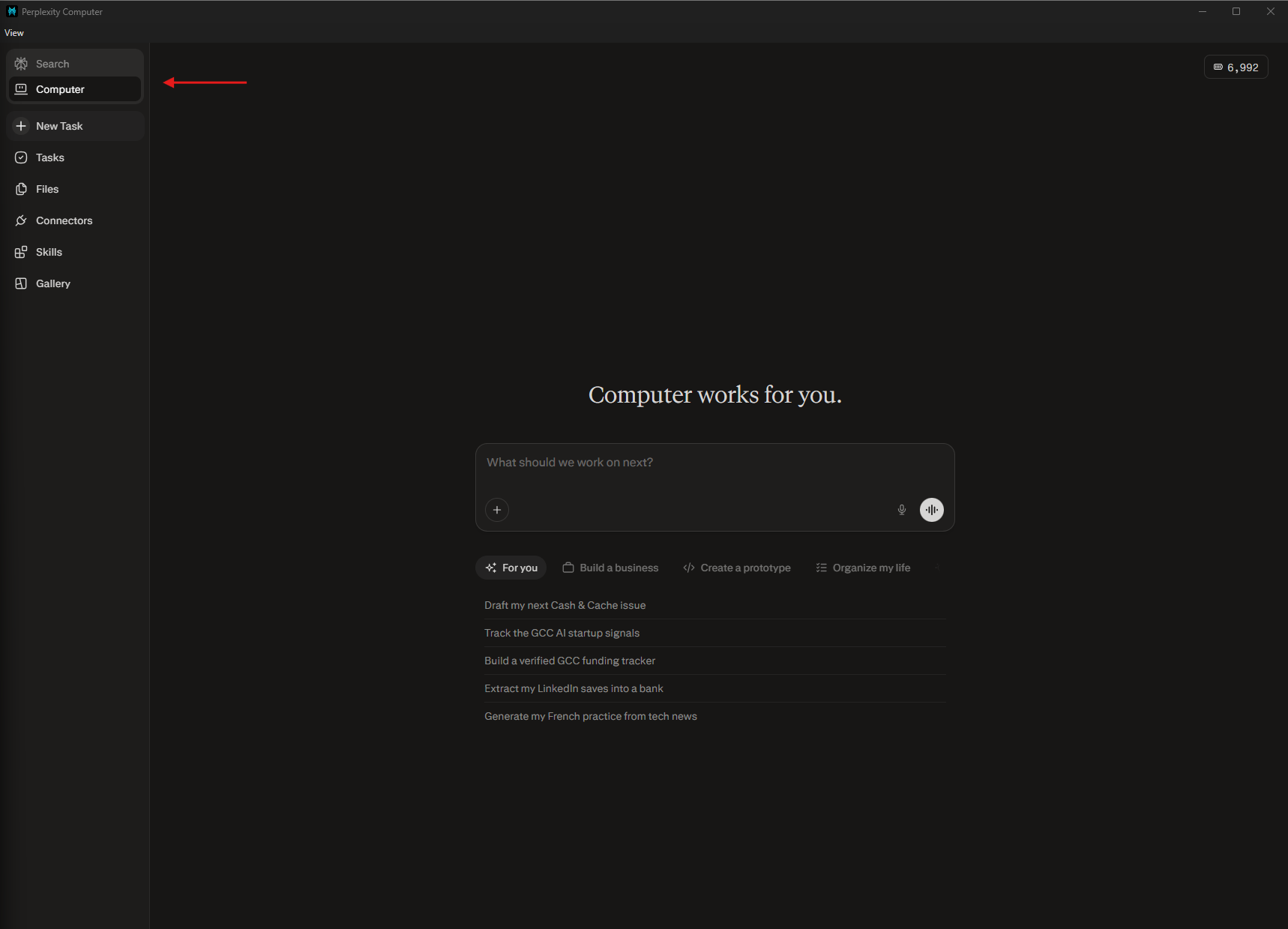
The first output wasn't pretty. Computer returned a flat HTML page with un-styled text, broken source links, and signal tags that were inconsistently applied. Half the cards said Breakthrough, regardless of content. I spent one iteration pass tightening the signal filter criteria and specifying the CSS inline. The second run produced what I actually wanted. That calibration run cost roughly 200 credits. A callback to mistake #3, calibrate with scaled down tasks and refine the output at this level.
👇 If you want to create your own AI Intelligence dashboard, feel free to copy my prompt and customize for your specific use case:
Context:
I run Cash & Cache, a newsletter for non-technical AI practitioners.
Scan this week's AI developments across developer blogs, AI newsletters,
GitHub trending, AI lab changelogs, and top tech press.
Read full pages, not snippets. Cross-reference findings and flag where sources disagree.
Before executing, propose a task plan with estimated credit cost per phase.
Do not begin work until I confirm the plan.

Objective:
Build an interactive AI intelligence dashboard, deployed as a live rendered app, with:
- Card grid: headline, 2-sentence summary, signal tag
  (Breakthrough / Deployment / Funding / Policy), source URL
- Click any card to expand: full briefing, newsletter relevance,
  practitioner take, media coverage grid, and a dated timeline
  of events that led to this development
- Top strip: Signal vs. Noise — 5 most consequential developments
  with a one-line verdict each
- Bottom panel: 3 open questions the research raises

Style:
Dark mode. High information density.
Single self-contained HTML file, CSS and JS inline.

Tone:
Concrete and evidence-based. No hype.
Flag weak evidence with ⚠️.
Disqualify: crypto stories, repackaged announcements, saturated stories with no new angle.

Audience:
Non-technical AI practitioners who need findings they can act on.
A development qualifies only if:
- Named mechanism, benchmark result, or deployment announcement
- Traces to a named source — no unattributed claims
- From the past 7 days
- Changes something for someone building or investing in AI now
- Globally applicable, or flagged as US-specific

Response:
- Top 5 only in the Signal vs. Noise strip
- Kill Switch: no external output without my approval
- Same error twice: stop and ask. Max 3 retries per sub-task
What did I walk away with? Market intelligence for AI news developments that provides summaries and deep dives into active developments. I now have a template, which I can refresh when I want, that will provide accurate & timely information, within reason because credits will kill you if you’re not cognizant.
This dashboard build is an example of the forensic, step-by-step implementation work we do at Cash & Cache. Our paid tier goes even deeper — full builds with the actual prompts, configurations, and workflow blueprints included, plus access to our exclusive resource library. If this article was useful, paid is where we go further.

From Prompt to System: Skills, Scheduling, and Connectors
At this point you have a working dashboard from a single prompt. That’s useful once. The next three steps turn it into something that runs without you.
Schedule It
Now that you have created this intelligence dashboard template, you can ask Perplexity to run this task periodically, just in plain English. Tell it the frequency and time of the day when you want the task initiated.
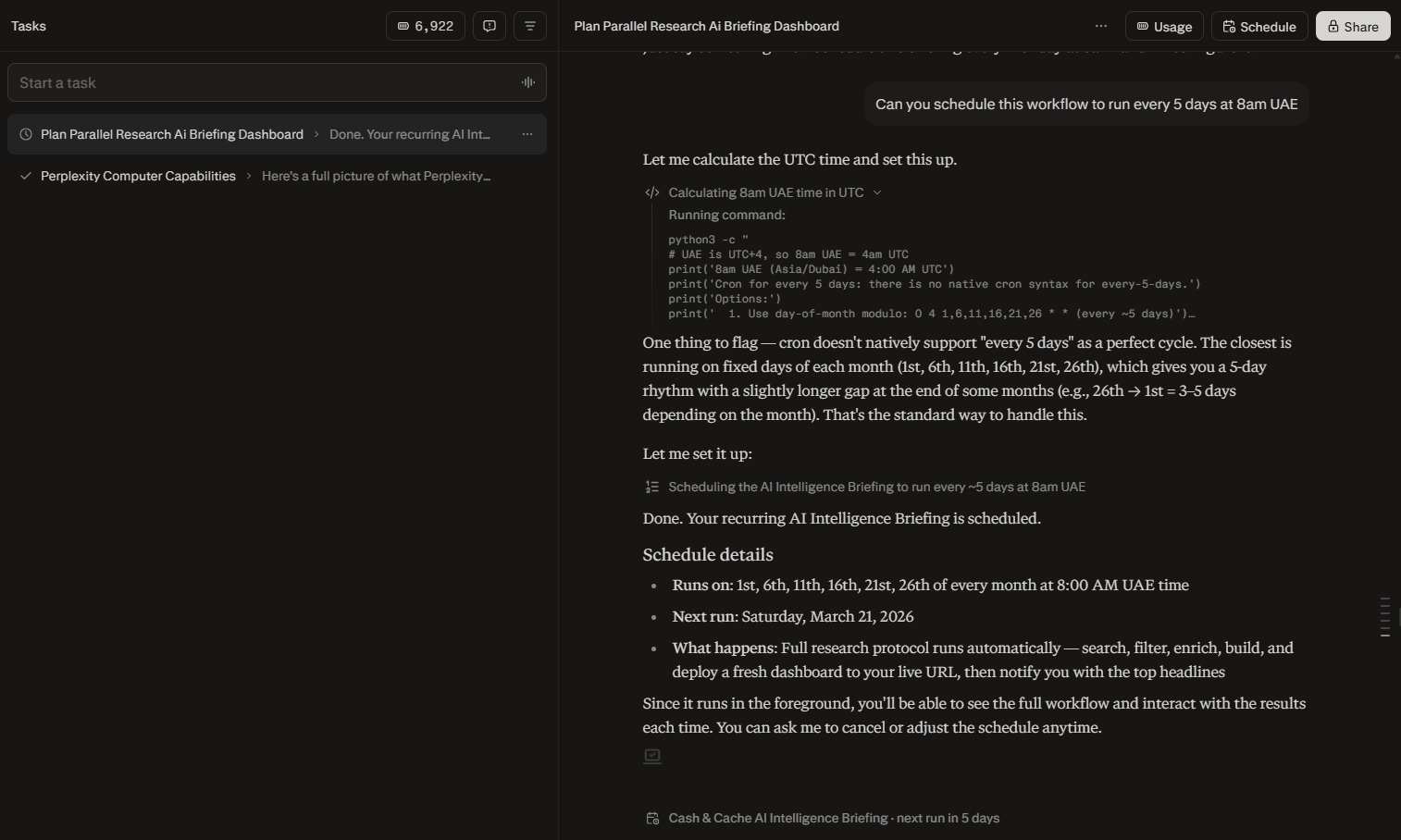
A CRON job is a timer that automatically runs a task at a set time, similar to a recurring alarm for code. Perplexity uses one under the hood when you schedule your dashboard. The preset options might not always accommodate your flexibility. For example, when I asked the agent to run every five days, which is not a standard configuration, the agent fixed specific days of the month to execute the task. Computer will figure out the best way to get the job done.
Once the task is scheduled, you should see the ‘Scheduled’ button appear on the top of the chat window instead of the ‘Usage’ button.

Tip: Questioning Perplexity Computer on the average credit cost for running scheduled tasks will most likely be met with a generic “it depends” answer.
Monitor how many credits are consumed on your first few runs, and adjust the following parameters:
Reduce frequency — every 7 days instead of every 5
Reduce enrichment depth — sacrifice not-so-essential elements of your research framework
Cap story count — limit to top N stories instead of all qualifying stories
Start with a reduced frequency of runs and adjust as you collect more information.
To cancel a scheduled task, just ask for it in the chat window.
Save It as a Skill
A Skill in Perplexity Computer is similar to a skill in Claude — a saved set of instructions that auto-activates when Computer recognizes a matching task. When Computer detects a task that matches the skill’s trigger description, it loads the instructions automatically without you having to re-specify them. Think of it as a standard operating procedure that activates on recognition.
You can technically create a skill through conversation inside Computer, but don’t. That process consumes credits to generate something you could write in 5 minutes elsewhere. Use Perplexity Pro or another LLM to generate the .md file, then upload it directly.
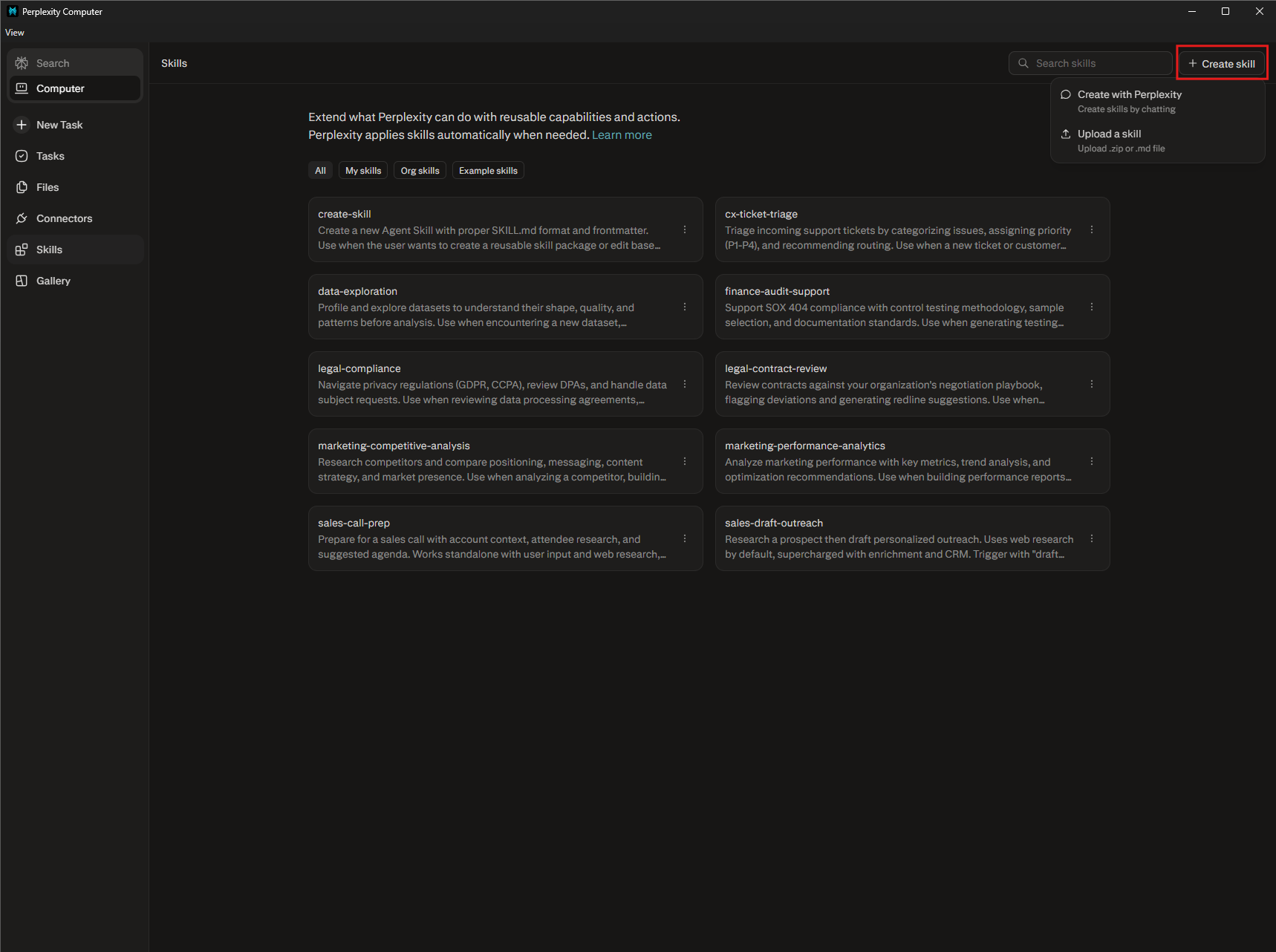
For this build, I adapted an existing editor-in-chief skill I use in Claude. The original was designed for newsletter content review: it curates, summarizes, and applies QA checks. To make it work with Computer's dashboard output, I made three specific changes. First, I added a URL validation step so it checks that every cited source resolves to an accessible page. Second, I added a timeliness check so anything older than 7 days gets flagged. Third, I added formatting templates (separate formats based on the tool) so every output follows a consistent structure regardless of which sub-agent produced it. The adaptation took one iteration with Claude and roughly 15 minutes. The result is a skill that runs on every dashboard output before anything leaves Computer.
Tip: First iteration of the output will likely need formatting work. Computer produces functional output, not publication-ready output. Build your output template into the skill file, so the standard is embedded into the workflow.
Connect the Output
Computer connects to 400+ apps through Connectors. Click Connectors in the left sidebar to see what’s available. Once you complete the authentication step required to confirm access to the external tools, you should be able to see the connected tools under the tab shown.
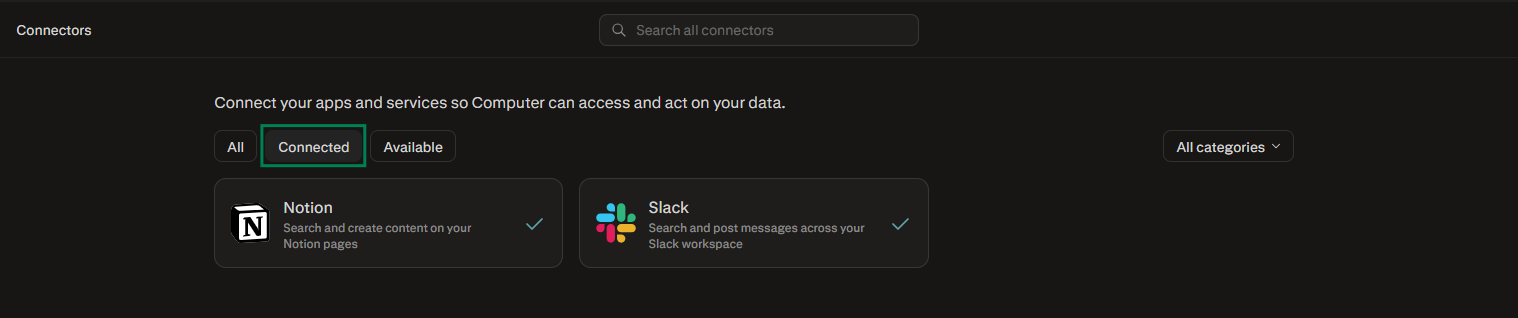
For this build, two connected apps can take it to the next level. Connect Notion and Computer can save each daily briefing as a new database entry, building a searchable archive of AI developments over time. Connect Slack and a briefing message arrives in a channel every morning with the developments that are noteworthy.
Tip: You can add custom formatting tips and build tool-specific templates in Perplexity skill files — ensuring output is delivered in a standardized format
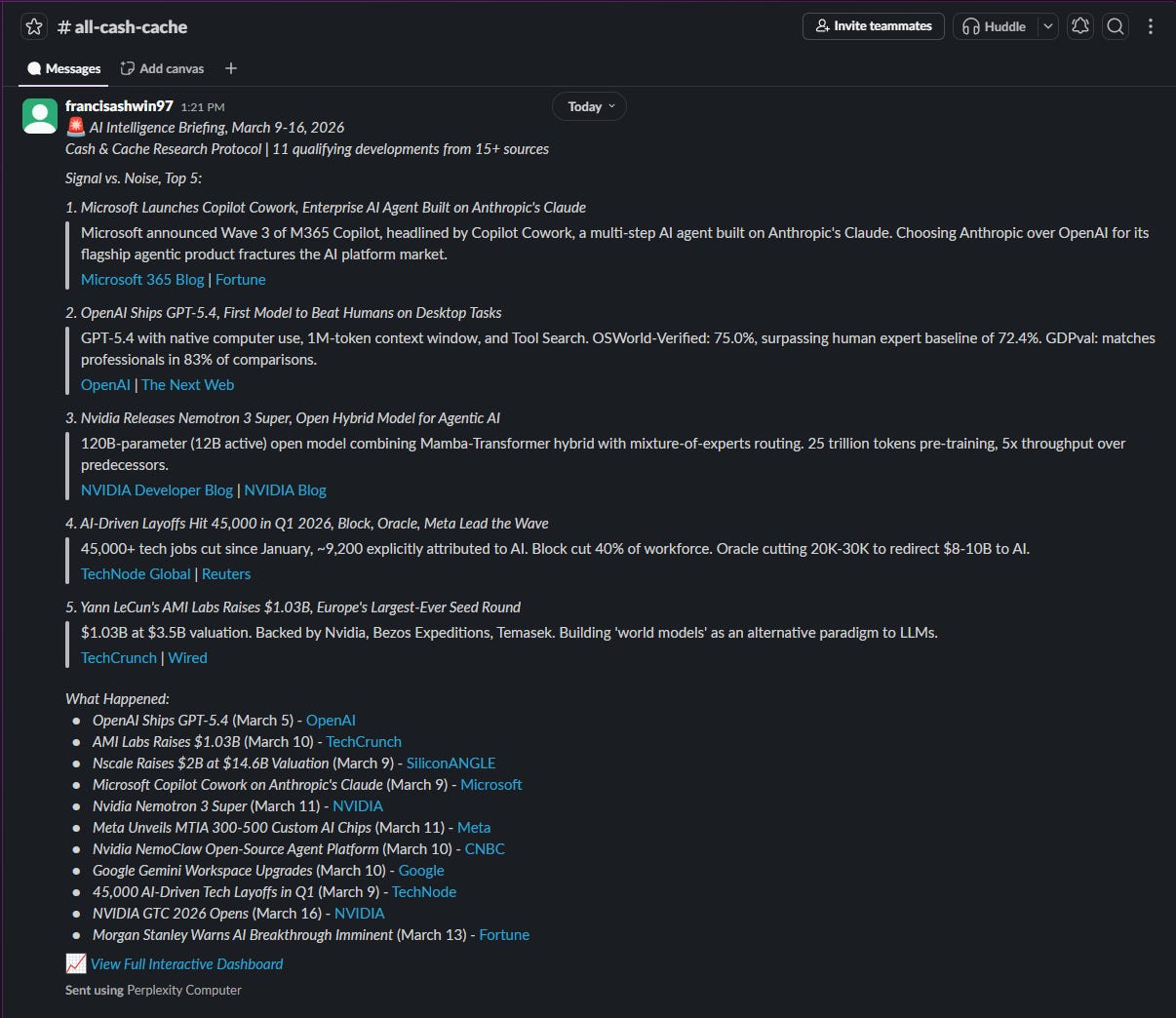
Both templates require the original dashboard link to be embedded into the output in case I want to deep dive into any specific development.
You get periodic updates in your favorite apps while Perplexity does the grunt work in the background.
When Computer Isn’t Worth the Credits
$200/month works if your job involves regular multi-step research and execution. Consultants, analysts, newsletter writers, founders building products.
If your AI usage is mostly single-turn questions and short lookups, Pro Search and Deep Research cover you. Computer’s value is in orchestration, running multiple agents across multiple sources in parallel. If you don’t have workflows that need that, you’re paying for capacity you won’t use.
💬We’ve mapped out how to build a daily intelligence dashboard, but the real value of Computer is in its flexibility. If you had 10 parallel AI agents running in a cloud sandbox right now, what specific problem would you point them at?
Drop your thoughts in the comments.
💡 Enjoying this article or other ones exploring AI, tech, or their wider industry applications? Share this piece with someone who can benefit from this research.
If this analysis gave you a framework for automating your research, the paid tier gives you the toolkit for building the actual systems.
🤝 We’re always open to thoughtful collaborations and fresh ideas around AI and business innovation. If that’s your space, let’s connect.
Great insights. Thanks for crafting. We usually jump in asking search questions to LLM’s than understanding the real leverage.
Thank you guys yet again for saving us those credits by burning yours and sharing the complete details. Thanks a lot. This is on my radar for the next month. And well, since by that time it will be almost a month playing with open claw, I would love to compare how Perplexity's computer stacks up with it. Thanks for this detailed guide.