

If Santa Used AI: How to Build an Intelligence System with NotebookLM + Gemini
3 Christmas-themed use cases showing how PMs and leaders can transform scattered information into strategic clarity.


Christmas is around the corner! 🎄
It’s one season we all look forward to—breaking away from work routines to holiday rituals, slipping into our comfortable pajamas and stockings, and preparing (and anticipating) creative ideas for Christmas gifts. 🎁
Of course, we have the additional enchantments of Christmas tales narrating how Santa Claus quietly plants gifts for children in their stockings on Christmas Eve. Although these are just tales, they add a magical essence and gleeful storyline to a festival that celebrates the birth of Jesus.
But my curiosity got me thinking: what if Santa Claus actually existed and pondered over gift ideas? How would he understand everyone’s needs and wishes? What would his research look like and consequently his intelligence gathering system? How many file cabinets and documentation systems would be needed to streamline this whole process? And then the next thought: Santa would probably use AI for all these workflows.
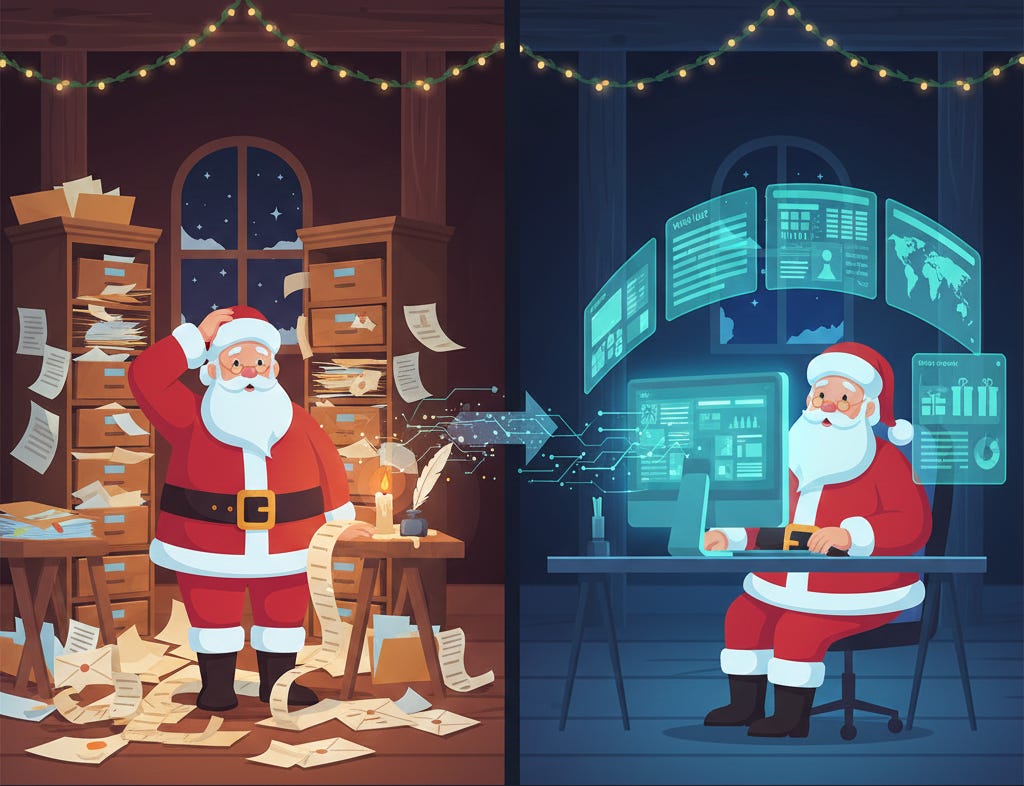
Understanding what 8 billion people actually want from scattered, messy signals. Modern PMs face the same problem with research papers, market docs, and user feedback.
So I decided to step into the big boots of Santa Claus to create a simple intelligence system that researches topics, synthesizes information, and creates executive reports that help capture the underlying ideas and insights from an array of information dispersed across multiple sources.
I used two of the most popular Google AI tools—NotebookLM and Gemini (with Nano Banana Pro and Canvas)—to streamline these workflows.
Use Case 1: “Santa’s Workshop Automation Strategy Report 🎅”
Santa’s Challenge: Santa’s workshop has been making toys the same way for centuries, but the elves are now talking about automation—robotic assembly lines, AI-powered quality control, autonomous logistics. Santa has twelve dense technical reports totaling 300+ pages and one month to decide which automation systems to invest in.
Moving From Research Chaos to Strategic Clarity 💡
The Challenge Leaders Face: Enterprise leaders are drowning in technical documentation when evaluating new technology systems—dozens of vendor whitepapers, contradictory analyst reports, and dense research papers. Synthesizing 300+ pages into a coherent decision framework could take weeks.
Let’s take the example of: A product manager evaluating agentic AI implementation frameworks for enterprise adoption with research papers from Berkeley and Salesforce, case studies from various industries, and vendor documentation from LangChain to CrewAI.
The Workflow
Step 1: Enable Discovery and Create Your Research Base
Create a notebook using Google’s NotebookLM and enable the “Discover Sources” feature. This allows NotebookLM to search and pull relevant sources based on your research query.

Step 2: Query the Notebook for Research
Query the notebook in the chat to research your topic. For this example, I’m researching agentic AI systems, their industry applications, and evaluation frameworks for enterprise adoption in 2025.
👇My prompt:
What are the leading agentic AI implementation frameworks for 2025, how are they being deployed across different industries with measurable results, and what multi-dimensional evaluation criteria should enterprises use to assess adoptability considering costs, reliability, security risks, organizational readiness, and governance requirements?Step 3: Generate an Academic-Style Report
Click on “Report in Studio” feature to generate an academic-styled report on your topic with tabular data, section headers, and structured analysis.

👇The output:
Step 4: Create Visual Presentation Assets- Carousel slides
The report looks good but I want to encapsulate it in a snapshot underlining all key factors. Carousel slides will be useful here for leadership presentations.
Go to Gemini, click on the ‘Canvas’ mode in the chat widget and query a carousel creation prompt.
Recommendation: Use Claude to generate a prompt for carousel to ensure structure alignment between the report and the desired slides. Also, specify your brand colors.
Create a 6-slide professional carousel for the Agentic AI enterprise report. Slide 1: Title hook.
Slide 2: Three agentic principles + comparison table (Traditional/Generative/Agentic AI).
Slide 3: Four implementation frameworks in grid matrices with architectural models and use cases.
Slide 4: Five industries with key metrics and applications in infographic rows. Slide 5: CLEAR evaluation framework as pentagon diagram with cost warning callout.
Slide 6: Three strategic recommendations with icons and CTA. Use tech blue palette (#006FDB, #060F19, #FFF9F5, #FF8C42), minimalist icons, clean tables, generous white space. Output: slide-by-slide specifications for Canva/Figma/PowerPoint implementation.👇The output:
Use Case 2: “Building Santa’s Distribution Network 🧦”
Santa’s Challenge: Santa’s workshop produces the best toys in the world, but none of that matters if children don’t know he exists. The North Pole’s “nice list” has hit a plateau, and the advice on successful distribution strategies is scattered across 30+ case studies, growth blogs, and creator interviews.
The Growth Challenge That Every Creator Faces 🤷
The Challenge Leaders Face: Newsletter creators face fragmented growth advice—dozens of “How I grew to 10K subscribers” articles, YouTube interviews with successful writers, and contradictory advice about monetization and distribution. The problem is synthesis paralysis, not lack of information.
Let’s take the example of: Our own Cash & Cache newsletter at currently at 600 subscribers. We have consumed countless growth case studies, read Substack’s official guides, and bookmarked tactical advice but still need a cohesive, stage-appropriate strategy.
The Workflow
Step 1: Build Your Growth Intelligence Base
Go to NotebookLM. Under “add sources,” provide the About Section text of your publication. You can also add links to website journals you’ve read or YouTube video interviews you’ve watched of successful content creators.
Step 2: Query for Comprehensive Strategy Synthesis
Query the notebook with a prompt that outlines your objective and milestones.
👇You can prompt:
Based on all uploaded sources—creator growth story videos, Substack interviews, web journals on content strategy, and my newsletter’s about section—synthesize a comprehensive newsletter growth strategy.
- What is the realistic growth timeline and what challenges should I expect?
- How should I balance content creation versus distribution and community engagement?
- Which growth tactics work at different subscriber stages (0-1K, 1K-10K, 10K+)?
- What makes newsletters in tech/AI succeed with differentiation and positioning?
- How should I structure free versus paid content for conversion?
- Where can AI tools assist my workflow while maintaining authenticity? Provide actionable recommendations specific to my audience and stage.
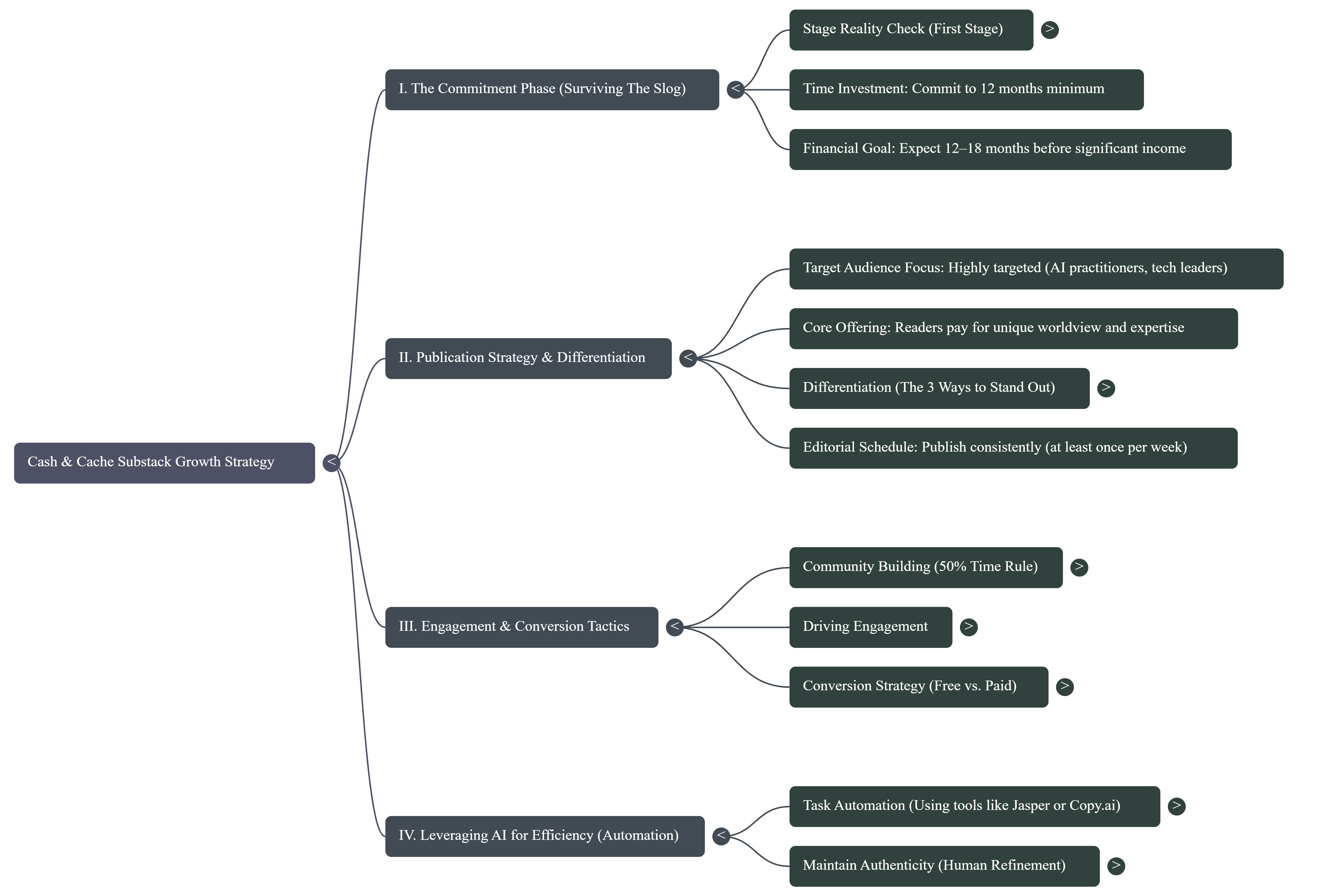
You get an overview of the suggested growth strategy that addresses “The Slog” (6-12 months of slow initial traction), the 50/50 rule (spend half your effort on distribution), stage-specific tactics, and differentiation strategies.
You can also generate a Video overview in the ‘Studio’ features.
Additionally, I’m interested in laying out a mind-map to break down recommendations into separate categories.
👇The output:
Step 3: Create Implementation Tools
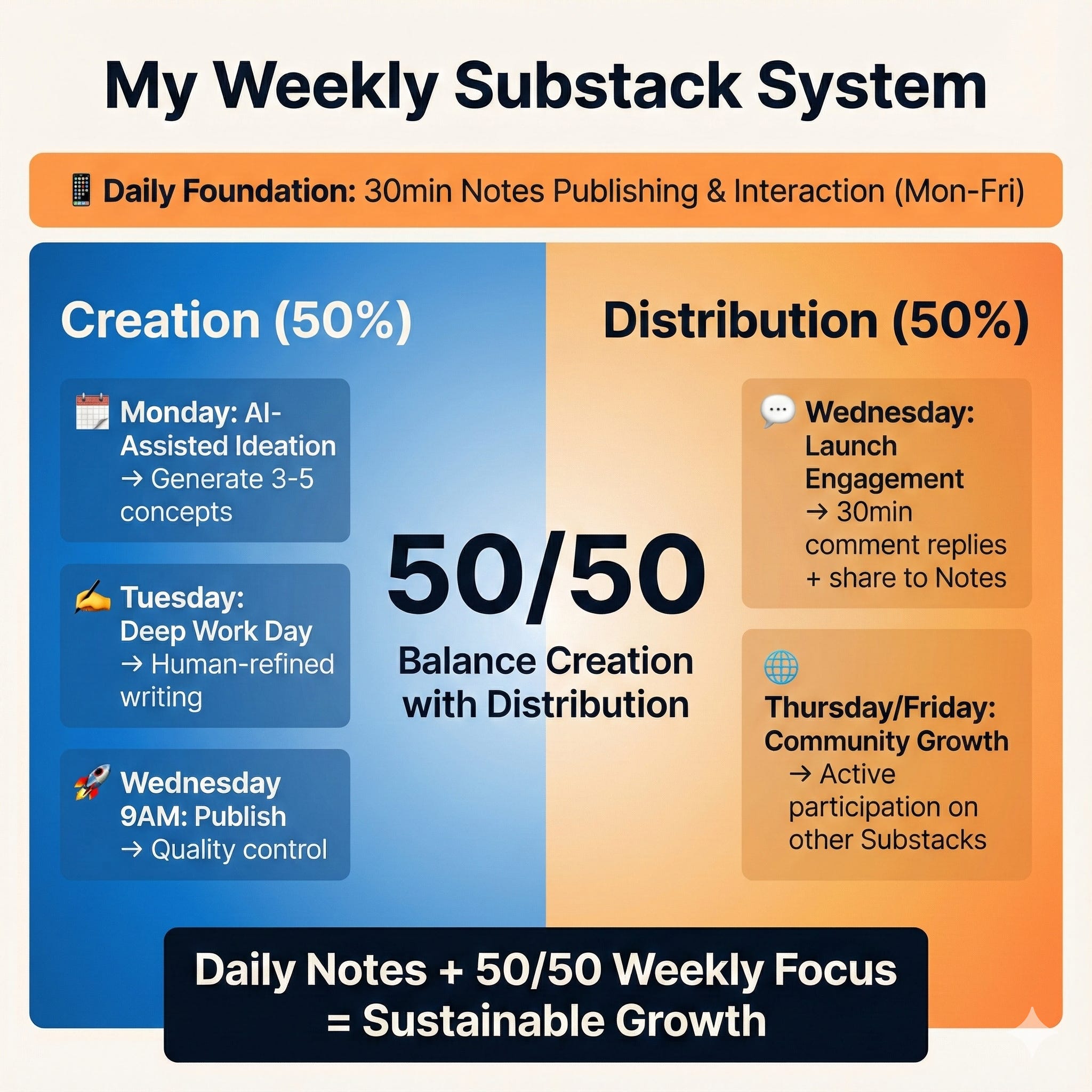
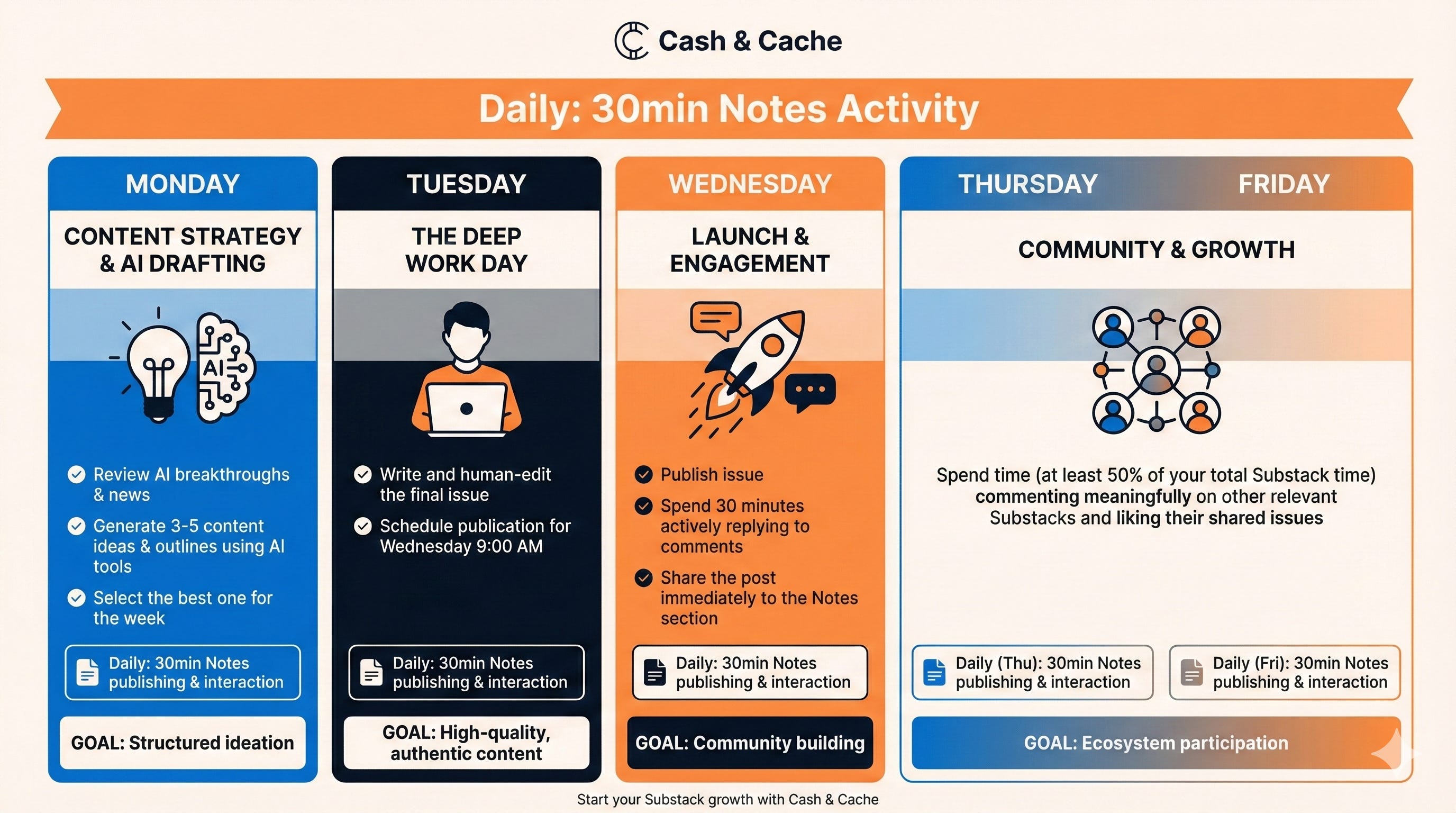
I’ve curated a weekly schedule for community interaction and engagement on Substack since it’s crucial for growth. Now I want to generate an infographic to showcase this schedule.
Go to Gemini, and after enabling “create images with Nano Banana Pro” toggle, prompt for a visual implementation tool.
I am still a beginner when it comes to using Nano Banana and if you are too, I’d strongly recommend reading the following articles on this subject:
I tried using Nano Banana Pro to create complex infographics by Karen Spinner
Visual ASMR: How to Make Oddly Satisfying Christmas Designs with Nano Banana by Karo (Product with Attitude)
I Let Nano Banana Redesign My Face 5 Times | How I Found My Brand’s Visual Style by AI Meets Girlboss
👇My infographic prompt:
Create a horizontal weekly calendar infographic showing my Substack content workflow from Monday to Friday. Use my newsletter Cash & Cache brand colors: navy (#060F19), off-white (#FFF9F5), blue (#006FDB), and warm amber (#FF8C42).
Aspect ratio: 16:9 (landscape/wide)

Monday: “Content Strategy & AI Drafting” - Icon: lightbulb + AI brain - Activity: Review breakthroughs, generate 3-5 ideas, select best + 30min Notes publishing/interaction - Goal: Structured ideation - Color: Blue (#006FDB)

Tuesday: “The Deep Work Day” - Icon: focused writer/laptop - Activity: Write and human-edit final issue, schedule for Wed 9AM + 30min Notes publishing/interaction - Goal: High-quality, authentic content - Color: Navy (#060F19)

Wednesday: “Launch & Engagement” - Icon: rocket + speech bubbles - Activity: Publish, reply to comments 30min, share to Notes + 30min Notes publishing/interaction - Goal: Community building - Color: Amber (#FF8C42)

Thursday/Friday: “Community & Growth” - Icon: network nodes/people - Activity: 50% of time on other Substacks, meaningful engagement + 30min daily Notes publishing/interaction - Goal: Ecosystem participation - Color: Blue to Amber gradient

Add a daily ribbon across all days: “Daily: 30min Notes Activity” in amber accent.

Background: Off-white (#FFF9F5). Use Nanobanana’s clean geometric style and make it shareable for LinkedIn/Substack.👇The output:
Use Case 3: “Santa’s Gift Recommendation Engine 🎁”
Santa’s Challenge: Santa doesn’t have a gift shortage—he has a matching problem. He needs intelligence: Given THIS child’s age, interests, and constraints—what are the 3 gifts that will actually bring joy?
The Tool Selection Paralysis Every Leader Faces 👷
The Challenge Leaders Face: Technology leaders face overwhelming tool selection paralysis—dozens of options claiming similar benefits, contradictory reviews, and not-so-cheap pricing. For regulated industries, you must also verify compliance and integration compatibility.
Let’s take the example of: A product manager at a 10-advisor wealth management firm with 47 browser tabs open researching AI tools, needing to recommend exactly 2 tools that fit specific constraints: $3K-5K budget, Salesforce/Orion integration, SEC/FINRA compliance, no IT staff.
The Workflow Reveal
Step 1: Upload Context-Specific Research Sources
Create a notebook in NotebookLM and upload 15-20 sources: AI tool comparison articles specific to wealth management, vendor documentation (Salesforce Einstein, TIFIN, Fiscal.ai), case studies from Morgan Stanley and Fidelity deployments, regulatory compliance guides, Reddit discussions, and your firm’s tech stack documentation.
Step 2: Query with Context-Specific Prompts
Run targeted queries to extract cited intelligence. Note: I used Claude to refine these prompts specifically for the wealth management fintech context, ensuring they capture regulatory requirements, advisor workflows, and compliance considerations.
👇Capability mapping prompt:
For each AI tool mentioned, what specific capabilities does it have for wealth management workflows? Organize by: client research and insight generation, portfolio analysis, compliance automation, meeting preparation, operational automation. Include pricing, regulatory compliance mentions, and citations.👇Advisor workflow matching prompt:
Which tools address specific advisor pain points: client research time, meeting prep, portfolio analysis, compliance documentation? How do they claim to improve advisor productivity? What ROI metrics are reported with specific percentages and company names? Cite sources for each claim.👇Compliance and integration prompt:
Which tools mention SEC/FINRA compliance, audit trails, or financial services certifications? Which integrate with Salesforce, Orion, portfolio management systems? What implementation complexity is mentioned for small firms? Provide citations.Step 3: Generate FAQ and Review Synthesis
Use NotebookLM’s FAQ generation feature to surface decision questions: “Which tools are compliant for regulated firms?” “What tools integrate with our existing stack?” “Which work for small RIAs?”
What you get: A structured, cited database of tools mapped to capabilities, compliance status, integration requirements, and quantified ROI.
The synthesis reveals 2 standout tools: Luthor (compliance automation addressing the #1 barrier: 51% cite time constraints) and Fiscal.ai (research copilot supporting the #1 priority: 84% focus on personalized advice).
👇The output:
Step 4: Feed Synthesis to Gemini for Strategic Convergence
Go to Gemini and input the NotebookLM synthesis plus your firm’s context (lets say, 10 advisors, $3,000-5,000 monthly budget, Salesforce/Orion/Microsoft 365 stack, SEC registered, 3-month deployment timeline, no IT staff).
Enable Nano Banana Pro in Gemini for visual deliverables.
👇Strategic recommendation prompt:
Based on the AI tool synthesis and my 10-advisor RIA context, recommend exactly 2 tools. For each: why it fits small firms, capabilities match, pricing for 10 advisors, integrations, compliance, implementation path, ROI projection, risks and mitigations, citations. Then add: combined rationale, 3-month roadmap, success metrics, executive summary.
Aspect ratio: 16:9 (landscape/wide)
Gemini with produces a detailed strategic memo justifying Luthor + Fiscal.ai with implementation roadmap, ROI projections (80% compliance time savings), risk assessment with HITL requirements, and executive summary.
👇The output:
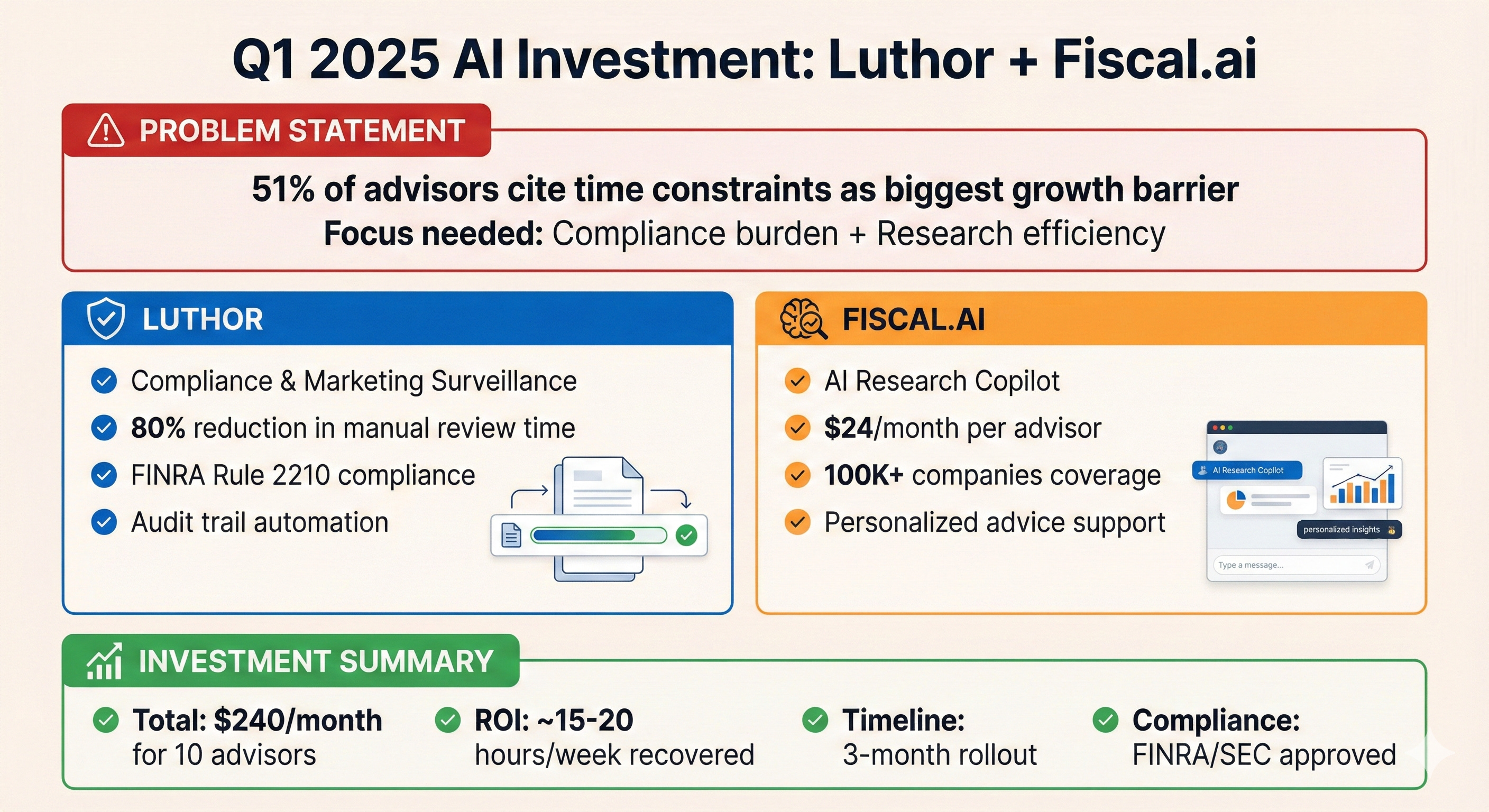
Step 5: Generate Visual Assets with Nano Banana Pro
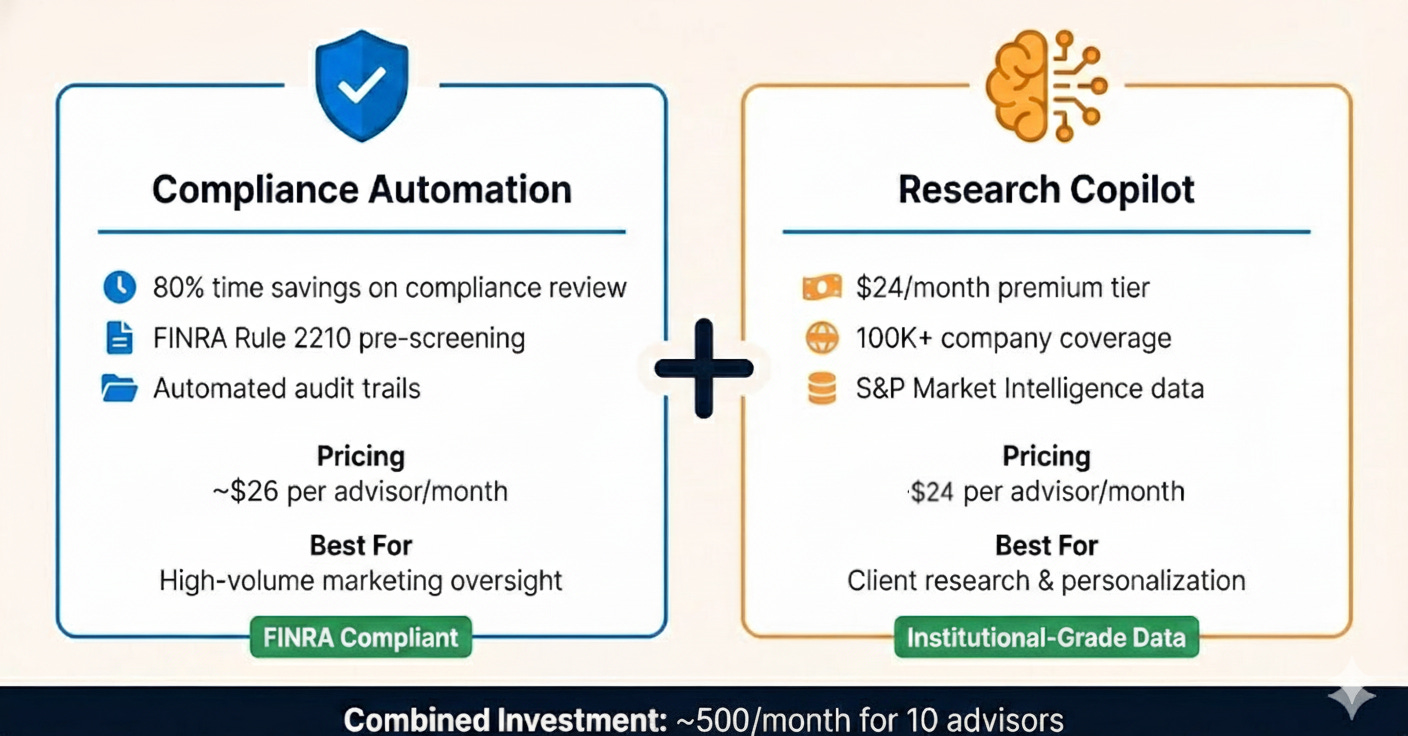
👇Side-by-side comparison card prompt:
Create infographic showing Luthor (compliance automation, FINRA compliant, 80% time savings) vs. Fiscal.ai (research copilot, $24/month, 100K+ companies) with Cash & Cache brand colors and combined investment total.👇The output:
Key Takeaways: The Intelligence Gathering Playbook 🎯
Across all three workflows—whether researching automation systems, building growth strategies, or selecting AI tools—the same pattern emerges: information chaos transformed into strategic clarity.
It’s only fitting that I show the strengths of these Google tools with an infographic here as well 😅👇.
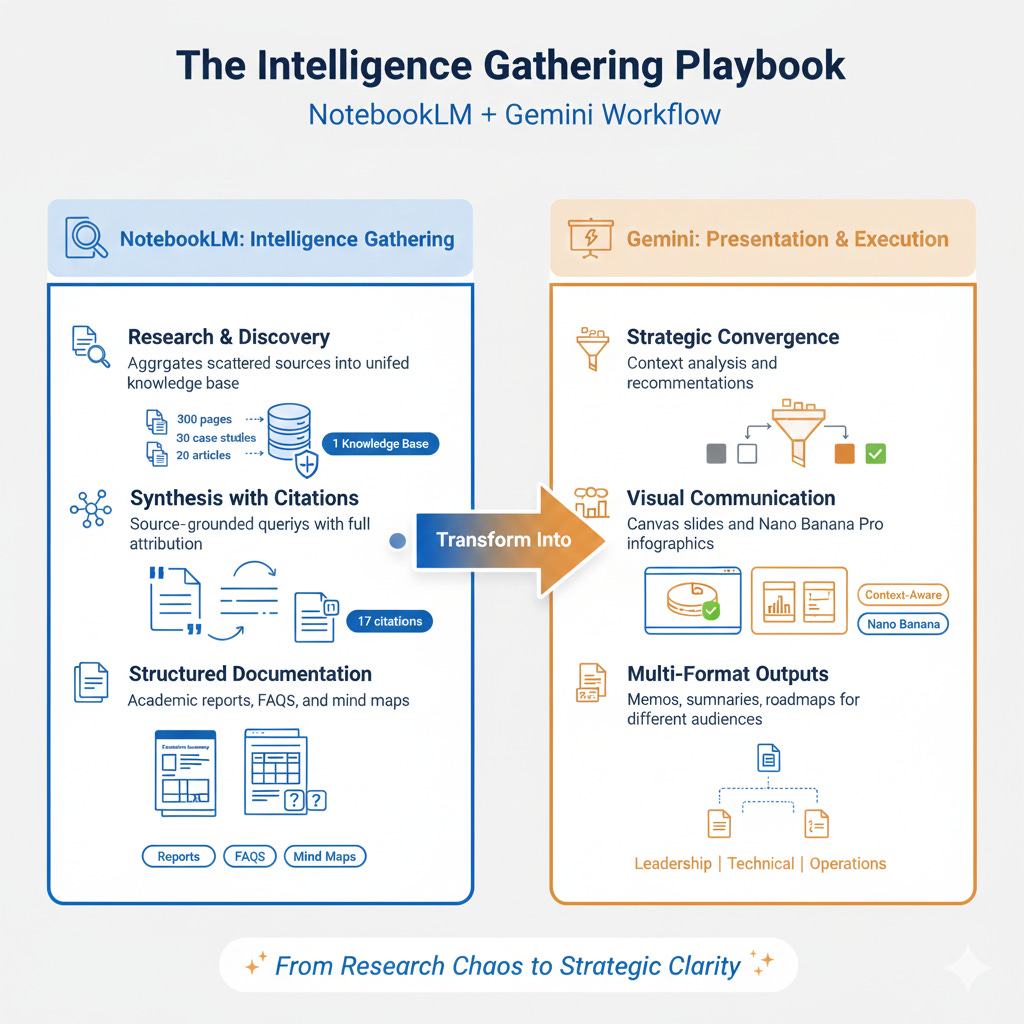
NotebookLM handles the research heavy lifting. It aggregates scattered sources into one knowledge base, extracts insights with citations intact, and generates structured reports. You go from 47 browser tabs and contradictory advice to a single synthesized document.
Gemini makes that synthesis actionable. It analyzes your specific context, converges on recommendations, and creates visual assets. The same intelligence becomes a strategic memo for leadership, a carousel for LinkedIn, and an implementation timeline for your team.
The workflow is universal: Upload → Query → Synthesize → Visualize → Decide.
What Santa Would Say 🎅
Santa’s intelligence operation wouldn’t run on magic, rather it would run on systems. The same systems modern leaders need: aggregate scattered signals, synthesize them into strategic intelligence, and communicate decisions that drive action.
This Christmas season, while Santa’s checking his list twice, you can build your intelligence gathering system once— and use it every time✨ .
The best gift you can give yourself isn’t more information. It’s the system that turns information into decisions.

🙌 This Week’s Essential Reads from our Community
Why Everyone Uses AI at Work but Pretends They Don’t by Daria Cupareanu. Daria unpacks the 69% of professionals who feel stigma around AI use at work—we hide what works because conformity runs deep and our value systems still measure worth by visible effort, not outcomes. The silence blocks knowledge-sharing, rewards inefficiency, and compounds anxiety. The fix isn’t evangelizing AI—it’s casually normalizing it through visible, low-key use.
I Didn’t Expect This Prompt to Go Viral. Here’s What It Taught Me. by Jenny Ouyang. Jenny’s 5-line prompt structure (Role + Goal + Constraints + Output Format + “Challenge my assumptions”) got 1,765 likes because it surfaces beliefs you don’t realize you’re making. The real power isn’t the framework—it’s the posture: using AI as a sparring partner that reveals cognitive dissonance between what you say, believe, and actually do.
Slow AI Goes Live - Poetry, Provocations, and Prompts by Sam Illingworth. Sam launched weekly live sessions with a simple format: one poem, one provocation, one prompt. The debut featured Richard Brautigan’s boredom poem, asking whether we even understand our own work before using AI to accelerate it, plus a genius prompt: “You are an inquisitive ten-year-old—ask simple questions until my description becomes completely clear.”
How to Turn One Newsletter Into Multiple LinkedIn Posts (Without Rewriting a Thing) by Melanie Goodman. Melanie’s system turns one Substack newsletter into 3-5 LinkedIn posts without rewriting: slice your best newsletters into standalone angles (story, framework, myth-bust, mistake), shape each for LinkedIn’s native format, then use soft CTAs to pull readers back. LinkedIn creates reach, Substack builds ownership—together they compound your ideas instead of exhausting them.
The State of AI in 2025 - According to Substack by Joel Salinas. Joel surveyed 50 Substack AI leaders and found three paradoxes: 77.5% use AI multiple times daily while 17.9% worry about over-reliance, 30% cite “no time to learn” as the biggest barrier while 20% report no gap, and 27% want autonomous agents but almost nobody uses them yet. We’re in the awkward middle between adoption and trust.
Where Substack is Headed in 2026 by Mack Collier. Mack predicts Substack will hit a 10x growth surge (5M to 50M paid subscribers) within 2 years based on the $100M funding round and Hamish McKenzie’s public signal. Ads are coming (likely opt-in sponsorships first), user experience will get chaotic with influencer wars and troll behavior, and the true growth window lasts under a year—position now or miss it.
I’ve walked you through three workflows—now it’s your turn. Which use case will you try first? Pick one, spend 30 minutes building it, and report back in the comments. What worked? What surprised you? Let’s learn from each other’s experiments. 💬
💡 If you’ve been enjoying this article or other ones exploring the AI and Big Tech, consider pledging to support Cash & Cache. It keeps us motivated to cover and write around AI applications.
🗞️ Interested in staying up to date with latest news around tech and business but not getting enough time?
The Weekly Cache has you covered! It’s our weekly news digest that rounds up all the important news stories in tech, markets, and, business in a crisp, sub 5-minute read. Check out last week’s news stories:

🤝 We’re always open to thoughtful collaborations and fresh ideas around AI and business innovation. If that’s your space, let’s connect.
Thanks team, this is an excellent post. I've just moved over to Gemini from ChatGPT, so I'm going to be using this myself as I think about both the direction of slow AI and also my own AI research into the new year. And Santa would definitely place both of you on the good list. Well done. 👏
Beautifully written ❤️