
12 Cowork Workflows From Practitioners Running Production Systems
How AI builders automate content production, security reviews, newsletter analytics, and backend workflows without writing code.


You know the pattern. New tool drops. You read the announcement, watch the demo, maybe even install it. Then it sits there.
Not because it’s bad — because you can’t see the bridge between “this is cool” and “this solves my actual problem.”
Claude’s Cowork is having that moment right now. Anthropic shipped it in late 2025.
What is Cowork? It’s a terminal-based agent that lives in your system, reads and writes files, executes multi-step tasks, and handles the kind of work that previously required either a developer or a painful amount of manual effort. Scheduled tasks, folder context, file operations — features that make sense on paper.
Being a non-technical professional myself, I used Cowork to build my entire content pipeline. Then, I wanted to go deeper into improve my conceptual understanding of the tool. When do you reach for Cowork instead of chat? What problems does folder-based context actually solve? How do you know if a workflow is worth automating?
To address these questions, I made an open invitation, calling upon several AI creators on Substack Team to share their experiences with and use cases in Claude Cowork.
The practitioners in this piece answered those questions by showing their builds in production and documenting their wokflows. These aren’t demos. They’re systems running real businesses, serving real audiences, handling real workflows that break if the automation fails.
What you’re about to see: 10 creators, 12 workflows, organized by type.
Content production systems that generate LinkedIn posts and analyze Substack quotes. Research agents that compound intelligence over time instead of starting from zero every morning. Security pipelines that handle the boring parts of code review so engineers can think like attackers. Backend automation that reconciles bank statements and organizes Apple Notes. Analytics workflows that audit newsletter performance and query CRM data conversationally.
Each of these have been indexed at the beginning of this piece, so feel free to start where you’d want to.
Each section is short — the problem, the solution, the impact, the limitations. The full implementation details (prompts, folder structures, CSV exports, plugin commands) are in linked Google Docs if you want to replicate the workflow.
The closing connects the patterns. But the patterns only make sense after you’ve seen the range. So let’s start with the workflows.
Types of workflows we will cover today…

Content Production Workflows
Dheeraj Sharma: Course Lesson Builder from YouTube Transcripts
Dheeraj had multiple YouTube videos for a complete n8n course. Converting transcripts into structured written lessons meant pasting context into chat every time: previous lessons, course config, brand voice, target audience.
He built a Cowork “course lesson builder.” Point it at a folder with video transcripts, brand voice guidelines, and course structure. Then: “Write lesson 7 on [topic]. Build on lesson 6, set up lesson 8.”
Cowork reads previous lessons, spots continuity gaps, produces a draft that fits the arc, and generates exercises and prompt blocks. Converting 40+ transcripts into structured lessons wasn’t feasible before. Now it’s repeatable.
Dheeraj writes GenAI Unplugged — AI automation for solopreneurs escaping manual chaos.
Heather Baker: Substack to LinkedIn Repurposer
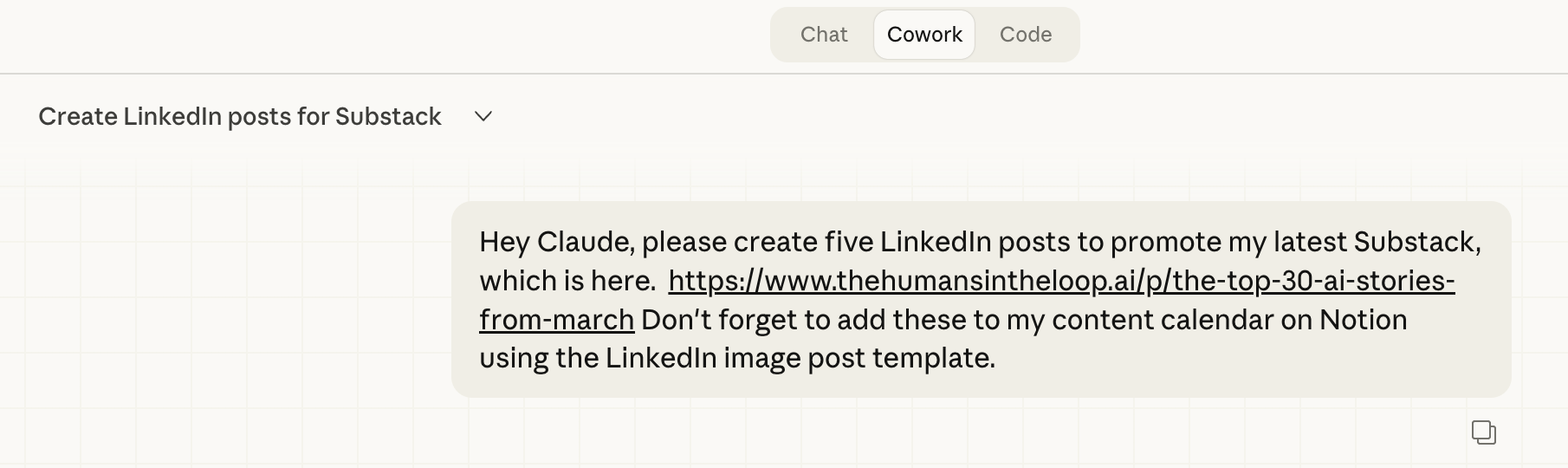
Heather promotes every Substack post on LinkedIn. She’d already written the post and done the thinking. Now she had to rewrite it for LinkedIn, create Notion entries, add tasks, and schedule everything.
Her Cowork workflow takes a Substack post and generates 5 LinkedIn posts (copy only), then adds them to her Notion content calendar with proper metadata.
Every morning, she reviews AI-generated content (isolated via Notion property), approves what works, and it flows into Social Pilot for scheduling.
Time saved: 5 minutes daily. Real impact: consistency. Before, she’d publish one or two LinkedIn posts per article. Now she promotes every post 5 times without friction.
Heather writes Humans in the Loop — AI integration for leaders who care whether humans thrive.
Jose Antonio Morales : Substack Quote Analyzer & Notion Archiver
Jose reads Substack and finds quotes worth keeping. Manual process: read, copy, paste to Notion, tag by theme, decide whether to publish. His themes carry nuance — matching quotes required interpretation, not keyword spotting.
He built the Substack Post Analyzer as a Chrome Extension using Cowork. No coding. Runs on the page he’s reading.
Workflow: open post, click extension. Claude analyzes and returns quotes matched to his themes. Select what to keep. One click saves to Notion with author, URL, theme, date. Optionally post to Substack Notes.
The shift wasn’t time saved — it was quality. Claude surfaced quotes he would’ve skimmed past. The Notion database became a thinking resource, not just a publishing queue.
You can find his full workflow documented in his GitHub repo here.
Access the workflow in motion through this video tutorial.
Jose writes Automato and Growing Fearless is an Adventure — business automation and transforming fear into freedom.
Dheeraj, Heather, and Jose are solving content problems, but notice what they’re not doing: none of them use Cowork to create content from scratch. They’re transforming content that already exists — transcripts into lessons, Substack posts into LinkedIn variants, articles into tagged quotes. Cowork shines at transformation and distribution, not generation. That constraint matters.
If your workflow is “stare at blank page, write brilliant prose,” Cowork won’t help. If your workflow is “I already wrote this, now I need to reshape it for three other platforms,” that’s Cowork territory.
Research & Intelligence Workflows
Wyndo: AI Research Agent with Memory
Wyndo had a Make.com automation sending AI news summaries weekly. Saved 3-5 hours. But every run started from zero. Couldn’t connect patterns across days or answer follow-ups.
He built an AI research agent in Cowork that runs daily briefings, deep research, and trend reviews. Uses Tavily MCP for live scanning, deploys parallel subagents, maintains a three-layer knowledge system: user preferences, trend index, daily logs. Intelligence compounds over time.
Three modes: Morning briefing (parallel subagents across topics, runs on schedule), Research [topic] (deep dive building on accumulated briefings), Trend review (weekly pulse-check, surfaces meta-patterns). You can read in details about this in his post here.
By Day 5, it connected dots he missed. Three announcements that looked independent were the same pattern. When he said briefings were too broad, it updated its own memory — permanently.
Three of his last five post ideas came from Emerging Patterns.
Wyndo writes The AI Maker — newsletter showing frameworks that turn AI into systems that change how you work.
Wyndo’s research agent is the first workflow you’ve seen that gets smarter over time. Dheeraj’s course builder doesn’t learn from lesson 6 when it writes lesson 7 — it just reads lesson 6 as context. Wyndo’s agent builds a trend index, remembers contradictions across sources, updates its own memory when you correct it. This is the compound interest model applied to workflows. Week 1 output is baseline. Week 4 output is exponentially better because the system remembers Week 1. Most treat AI tools as stateless — every session starts from zero. Wyndo built a system that treats sessions as chapters in a longer story.
Security & Technical Workflows
Chris (ToxSec): Full-Stack Security Review Pipeline
Security reviews bottleneck everywhere. Chris spent hours on first-pass work — triaging CWE patterns, sketching data flows, writing threat model boilerplate — before thinking like an attacker.
He built a security review pipeline in Cowork. Takes codebase or feature, runs automated code review for common vulnerabilities, security scanning, threat modeling, architecture diagram generation.
Chains multiple stages: static analysis, dependency checks, vulnerability identification (injection, auth bypass, SSRF). Builds threat model scoped to architecture, generates attack surface diagrams. Prompts tuned for red team thinking.
First-pass review that took half a day now takes 10 minutes. Real win: quality. When you’re not fatigued from boilerplate, you catch things you’d miss on review three of the week.
Still needs human in loop. Context-dependent vulns, business logic flaws — that’s on you. Force multiplier, not replacement.
Chris writes ToxSec — security for machines that lie. NSA, defense contractors, big tech background.
Chris’s security pipeline is the most technically sophisticated workflow so far, but here’s what’s interesting: it’s not automating judgment — it’s automating triage. The pipeline flags CWE patterns, generates threat models, diagrams attack surfaces. All pattern recognition, all repeatable. But business logic flaws? Context-dependent vulnerabilities? That still requires a human thinking like an attacker. This is the recurring theme across every workflow:
Cowork handles the setup, the grunt work, the pattern matching. The human handles the part where expertise actually matters. Force multiplier, not replacement.
Utility & Maintenance Workflows
Joel Salinas: Desktop Cleanup Automation
Joel’s desktop gets cluttered. Downloads and screenshots pile up. Weekly clutter adds friction.
He built a Cowork workflow that runs once a week, deletes all screenshots and screen recordings. Requests folder access, lists files matching macOS naming patterns, deletes them, confirms count.
Requires giving Cowork filesystem permission. Only do this if you understand access scope. Don’t run on computers with sensitive data without careful scoping.
Impact: clean desktop every Wednesday is freeing. Small automation, consistent relief.
Joel writes Leadership in Change at the intersection of leadership, strategy, and technology — for mission-driven leaders navigating AI without losing integrity.
Joel’s desktop cleanup is the floor. It’s not sophisticated. It’s not generating insights. It’s just deleting screenshots every Wednesday. That simplicity is the feature, not the bug. Sometimes you just need the boring thing to happen automatically so you stop thinking about it.
If you’re reading this and thinking “I should only use Cowork for complex multi-agent systems,” you’re missing the opportunity. Start simple. Automate the thing that annoys you. Then build up.
Data & Analytics Workflows
Karo (Product with Attitude): Conversational CRM Analytics via StackContacts
Cowork runs in the background of Karo’s workflow — scheduled tasks, file ops, content triage. But the most valuable integration pairs Cowork with Finn Tropy’s StackContacts, a conversational CRM for Substack subscribers.
Substack’s dashboard shows surface metrics. StackContacts stores deeper data. Pairing it with Cowork turns that data into a conversational analytics layer. She asks questions Substack doesn’t let you frame: How many days does it take a free member to convert to premium? Why did her favorite posts bring in zero new readers?
Instead of exporting CSVs and building pivot tables, she asks natural language questions and gets structured answers that inform content strategy.
Full workflow here. Also, Read her 10 tools breakdown where she has stated extensively about StackContacts and 9 other tools that help her run her publication.
Karo writes Product with Attitude — 15,000+ readers learning to build with AI, not just use it.
Raghav Mehra: Using Cowork to Audit My Own Newsletter
I check Cash & Cache’s dashboard after every post — subscriber count, open rates, a handful of charts. Not enough. I wanted to know which posts actually drive engagement, how content performs over time, what patterns the default view doesn’t surface.
I’d built my own analytics audit using the Data Analysis plugin in Cowork.
I exported Substack’s analytics CSVs, dropped them into a project folder, installed the plugin, ran /explore-data and /analyse commands.
What came back: a 7-section performance report covering subscriber growth , engagement trends, content breakdown, traffic sources, and strategic priorities by time horizon.
The findings changed my content strategy. Read my full workflow here.
Two caveats: the plugin didn’t ask follow-up questions, so it made assumptions I had to catch. And it didn’t cite which CSV informed each insight — I had to verify manually.
Strong at pattern detection, weak at judgment calls. Trust but verify.
My full guide on working with Cowork Plugins here.
Karo and I are both using Cowork for newsletter analytics, but through different architectures. Karo pairs Cowork with StackContacts, an external CRM — the CRM holds the data, Cowork acts as the conversational query layer. I used Cowork’s Data Analysis plugin directly on CSV exports — no external tool, no CRM layer. Same outcome (understanding newsletter performance), different paths.
Karo’s approach works wonderfully, especially if you already have a CRM and want conversational access. Mine works if you have data exports and want structured analysis without adding another tool.
Backend Automation Workflows
Daria Cupareanu: Two Workflows That Remove Monthly Friction
Daria built two Cowork workflows that handle boring, necessary tasks.
Workflow 1: Monthly Bank Reconciliation
Every month, Daria sends her accountant a clean set of invoices matched to her bank statement. Half the platforms don’t send invoices via email.
Automated workflow runs on the 1st of every month. Drop bank statement and invoices into a folder. Cowork extracts transactions, matches against invoices, flags what’s missing, renames files (YYYY-MM_Vendor-Name), sorts into monthly subfolders, generates Excel file.
What took a full afternoon now takes zero active time. Biggest win: on the 1st, she knows exactly which invoices are missing — instead of finding out when her accountant asks mid-week.
Workflow 2: Weekly Apple Notes Organizer
Daria takes notes constantly. They go into Apple Notes and sit there. Most disappears into the pile.
Workflow runs every Saturday using Apple Notes connector. Reads recent notes, categorizes everything (unfinished tasks, content ideas, saved research), runs a content strategy pass. Suggests newsletter angles, builds review list, gives her a Monday priority task.
She’s turned forgotten notes into newsletter content. The Monday priority task changed how she starts her weeks.
Daria writes AI blew my mind — systems, not tips. She builds AI automations for herself first, then hands you the blueprint.
Daria’s workflows are pure maintenance. Bank reconciliation, note organization — nothing creative, nothing strategic, just the necessary work that has to happen monthly or weekly. She automated these not because they’re complex, but because they’re consistent. The psychological win isn’t just “this takes less time now.” It’s “I don’t carry the mental load of remembering to do this anymore.” Scheduled automation doesn’t just save minutes — it frees attention.
Writing & Content Optimization Workflows
Asli Öztürk: Two Workflows That Transform How She Writes
Aslı built two Cowork workflows handling different parts of her writing process — one removes the blank page problem, the other handles SEO without breaking her flow.
Workflow 1: Draft Generator Using voice.md + audience.md
The worst part of writing is the starting. Staring at a blank page is brutal when you’re trying to nail a specific tone. Aslı’s readers want clarity and human connection, not technical jargon. But with an engineering background, she either slips into “tech speak” or overcorrects into generic.
She built a workflow that transforms messy ideas into structured drafts using two living documents: voice.md and audience.md. She calls this building an “AI digital twin” (setup guide). These aren’t static files — they’re evolving profiles of her writing style and readers.
When she has an idea (messy bullet list, shower thought), she drops it in. The workflow reads both files and produces a first draft that already sounds like her.
Most people try to describe their voice to AI. She found showing it real examples works far better. Instead of instructions, she gives it evidence.
The “blank page” problem is mostly gone. Instead of fighting with a blinking cursor, she sharpens and edits a piece that already feels like hers. Here’s how she built her voice.md and audience.md.
Workflow 2: SEO Optimizer Skill
Aslı writes for humans, not algorithms. But as her newsletter grows, discoverability matters. SEO was foggy. She either skipped it or wasted 30 minutes per post down Google rabbit holes.
She built an SEO Optimizer Skill inside Cowork. After finishing writing, she grabs her Substack secret draft link, pastes it in, and gets back a full report within a minute. It analyzes her voice so recommendations don’t sound alien, suggests optimized titles, headings, URL slug based on keyword research, writes a ready-to-use meta description.
The entire prompt after the Cowork setup is one line: “Improve SEO for this article draft: [link]”
What comes back isn’t vague “best practices” — it’s a complete SEO report with an implementation checklist she moves through in minutes before publishing.
SEO is no longer a daunting separate task. It’s the final sanity check before hitting publish.
Aslı writes Becoming with AI — practical strategies for thinking with machines. The translator between code and culture.
Aslı’s workflows show something the earlier examples didn’t: Cowork Skills as reusable commands. Her SEO Optimizer isn’t a one-time script — it’s a packaged skill she can invoke with a single line. That’s the next level of sophistication after folder-based workflows. You build the workflow once, abstract it into a Skill, and now it’s a tool you can deploy on any article without rebuilding the logic. Dheeraj and Heather are running workflows. Aslı is building tools on top of workflows. That’s the progression.
The Patterns
These workflows look different on the surface, but they share structural DNA.
Pattern 1: Repetition + Context = Cowork Territory
Dheeraj writes course lessons. Heather generates LinkedIn posts. I audit newsletter performance. Daria reconciles bank statements. The common thread isn’t the task — it’s that the task repeats, and doing it well requires referencing multiple files or past outputs every single time.
Chat can’t hold that context across sessions. You’d paste your brand voice, previous lessons, course structure, target audience into every conversation. Cowork reads the folder once. The context persists.
Pattern 2: Workflows That Learn
Wyndo’s research agent gets smarter over time. It maintains a trend index, remembers past findings, connects patterns across days. Daria’s Apple Notes organizer builds a content strategy layer on top of raw notes. Aslı’s draft generator evolves as her voice.md file grows.
This is the opposite of stateless chat. The system compounds. Week 4 is better than Week 1 because the system remembers Week 1.
Pattern 3: Scheduled Automation
Joel’s desktop cleanup runs every Wednesday. Daria’s bank reconciliation runs on the 1st of every month. Wyndo’s morning briefing runs on a schedule so it’s waiting when he sits down.
You’re not triggering these workflows manually. They’re infrastructure. They run whether you remember them or not.
Pattern 4: External Tool Integration
Karo pairs Cowork with StackContacts to query CRM data conversationally. Jose built a Chrome Extension on top of Cowork to analyze Substack posts without leaving the browser. This isn’t “Cowork vs other tools” — it’s Cowork as the reasoning layer on top of tools that hold the data.
Pattern 5: Force Multipliers, Not Replacements
Chris’s security pipeline still needs a human to catch business logic flaws. My newsletter audit gave me the numbers but not the judgment call. Aslı’s SEO optimizer handles the checklist but can’t decide if the post is worth publishing.
These practitioners didn’t hand their jobs to Cowork. They handed Cowork the boring parts so they could focus on the parts that require judgment.
The Meta-Pattern: Start Small, Compound Over Time
Joel started with desktop cleanup. Heather started with LinkedIn repurposing. I started with newsletter analytics. Wyndo started with daily briefings. The sophistication came later — after they understood the tool’s shape and saw what compounded.
None of these workflows existed four months ago. They’re all running in production now.
The decision tree is simple:
Use Cowork when: You repeat a process regularly, it needs to reference multiple files or past outputs, you want it to run on a schedule, or you’re building something that gets smarter over time.
Use chat when: One-off questions, exploration, brainstorming without needing prior context.
Use Claude Code when: CLI-based tasks, writing/editing code, Git operations, terminal automation.
Start with the boring thing you do manually every week. Build one workflow. Let it run. Watch what breaks. Fix it. Then build the next one.
What’s the boring thing you do manually every week? The task that’s tedious enough to dread but important enough that you can’t skip it? That’s your entry point.
Drop a comment below with the workflow you’re thinking about building. Or if you’ve already built one — what worked, what broke, what you’d do differently.
The workflows in this piece come with full implementation details — prompts, folder structures, CSV exports, plugin commands — linked in Google Docs. If you want the Cash & Cache toolkit for building workflows from scratch (prompt templates, tool evaluator framework, workflow blueprints, Claude Skills, organizational frameworks), that's what paid subscribers get.
🤝 We’re always open to thoughtful collaborations and fresh ideas around AI and business innovation.
 | A guest post by
|
 | A guest post by
|
 | A guest post by
|
 | A guest post by
|
 | A guest post by
|
 | A guest post by
|
 | A guest post by
|
 | A guest post by
|
 | A guest post by
|